

When a scene is GPU-light but still slow, or your mobile game stutters as soon as the level fills up with props, the CPU is often drowning in draw calls: the work of telling the GPU what to render. Unity 6 gives you several tools to cut that cost, and they interact in ways that confuse a lot of people. This guide explains how to reduce draw calls in Unity 6 URP: what draw calls and SetPass calls really are, the SRP Batcher, the GPU Resident Drawer, GPU instancing, static batching, texture atlases, and how to check your results in the Frame Debugger.
Draw Calls, Batches and SetPass Calls
A draw call is the CPU asking the GPU to draw a mesh. On its own that’s cheap. What’s expensive is the state changes around it: switching shaders, binding textures, uploading material properties. Unity reports:
- Batches: groups of draw calls Unity submitted. Fewer is better, but the number alone can mislead.
- SetPass calls: how many times the shader pass (render state) changed. This is usually the more meaningful number to drive down.
Rough targets: a few hundred batches on mobile and a few thousand on desktop, but always judge by CPU frame time in the Profiler (on the main and render threads), not by the number. Our frame-time budget guide explains how to set targets.
Measuring: Stats, Profiler and Frame Debugger
- Game view > Stats: shows Batches, SetPass calls, and “Saved by batching”. Good for a quick check.
- Profiler > Rendering module: batches, SetPass calls, triangles and vertices per frame on the target device.
- Window > Analysis > Frame Debugger: steps through every draw in a frame, and for each one shows why it couldn’t be batched with the previous one (for example “objects have different materials” or “SRP: node use different shader keywords”). This is the most useful tool here.
Always confirm improvements by profiling a development build (see our Profiler beginner’s guide).
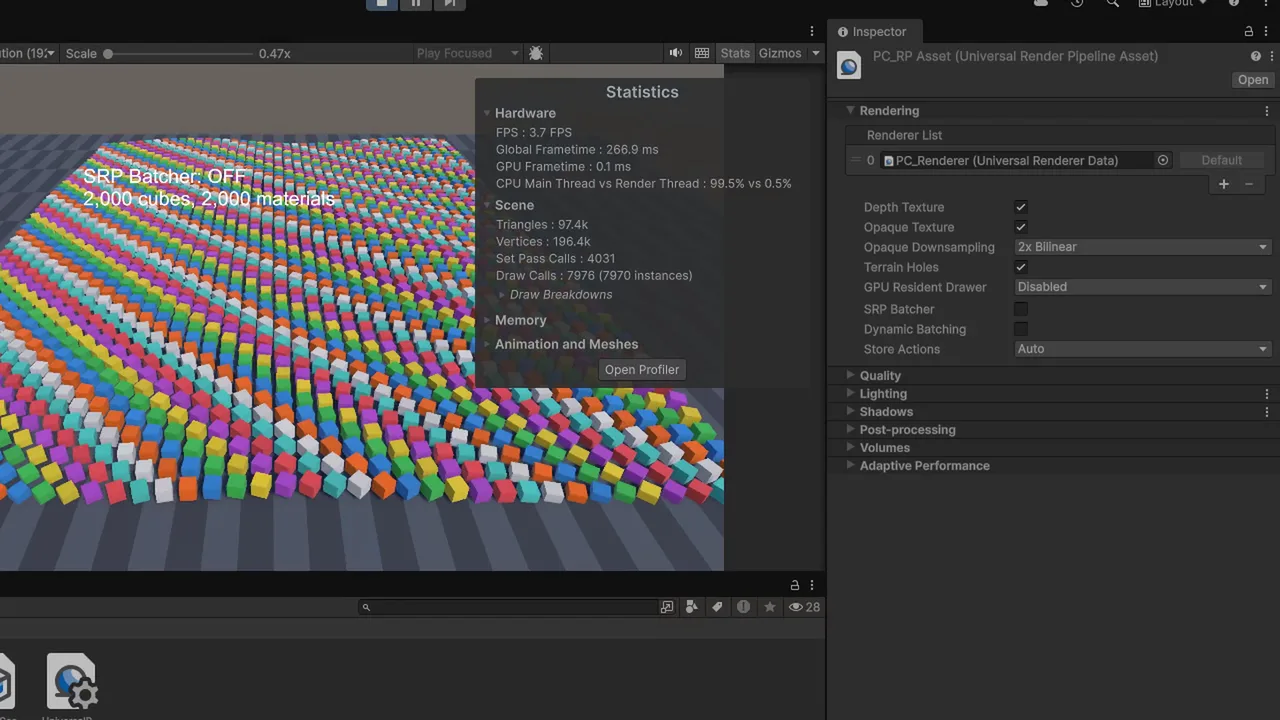
The SRP Batcher
In URP and HDRP, the SRP Batcher is the main batching system and is on by default (URP Asset > Rendering > SRP Batcher). It doesn’t merge meshes. It makes each draw cheap by keeping material data persistently on the GPU, so consecutive draws using the same shader variant skip most of the setup, even with different materials.
To benefit:
- Use SRP Batcher-compatible shaders. All URP Lit/Unlit shaders and Shader Graph shaders are compatible. Select a shader asset and the Inspector shows “SRP Batcher: compatible”.
- Use fewer shader variants. Different keywords (for example normal map on vs off) are different variants and break up SRP batches. Standardize material features across props.
- Avoid
MaterialPropertyBlockon SRP Batcher objects. It makes them incompatible. Use separate materials or per-instance properties via instancing instead.
Hand-written shaders need all material properties in a CBUFFER_START(UnityPerMaterial) block to be compatible.
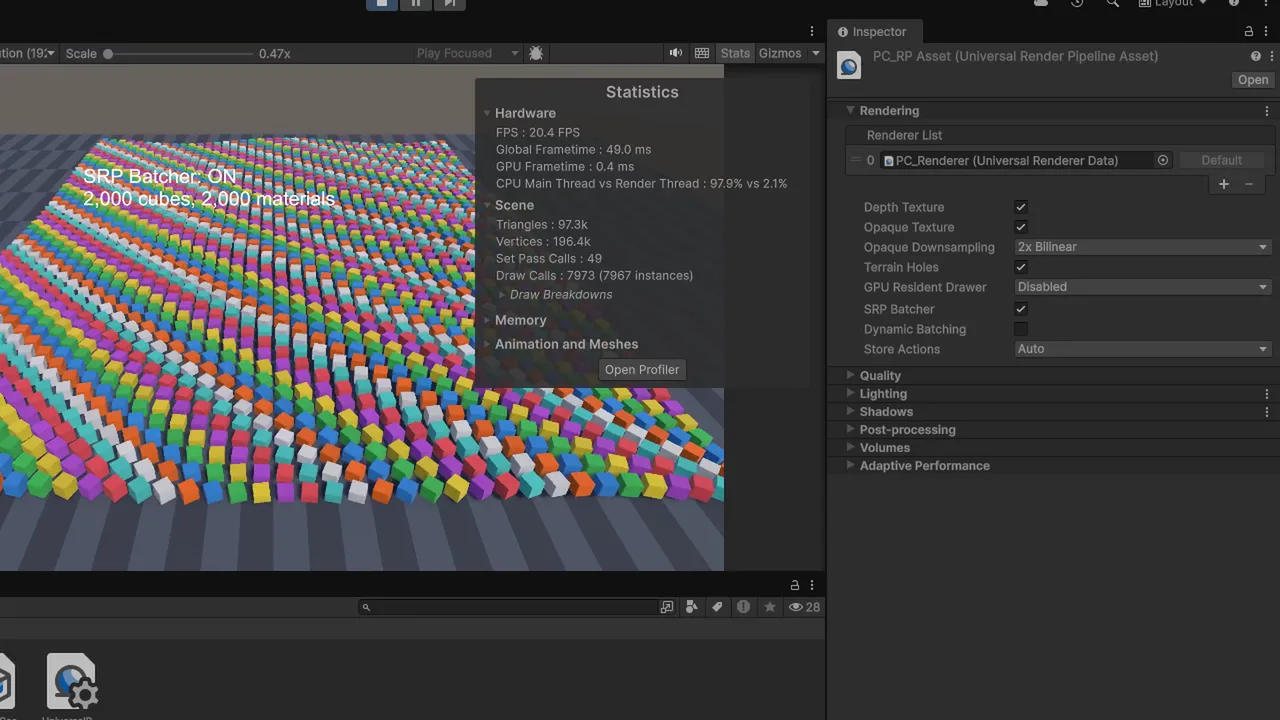
GPU Resident Drawer (Unity 6)
Unity 6 adds the GPU Resident Drawer, which automatically uses instanced drawing (via the BatchRendererGroup API) for regular MeshRenderers. It can dramatically cut CPU render cost for scenes with many repeated meshes, such as forests, cities and modular levels.
- In the URP Asset, set GPU Resident Drawer to Instanced Drawing.
- In Project Settings > Graphics, set BatchRendererGroup Variants to Keep All.
- Use the Forward+ rendering path in the URP Renderer.
It works on platforms with compute shader support (desktop, consoles, modern mobile on Vulkan/Metal) and skips objects it can’t handle (for example renderers with MaterialPropertyBlocks or certain callbacks). Pair it with GPU Occlusion Culling in the same settings. More in our upcoming LOD and occlusion guide. If you’re moving an older project over, see upgrading a project to Unity 6.
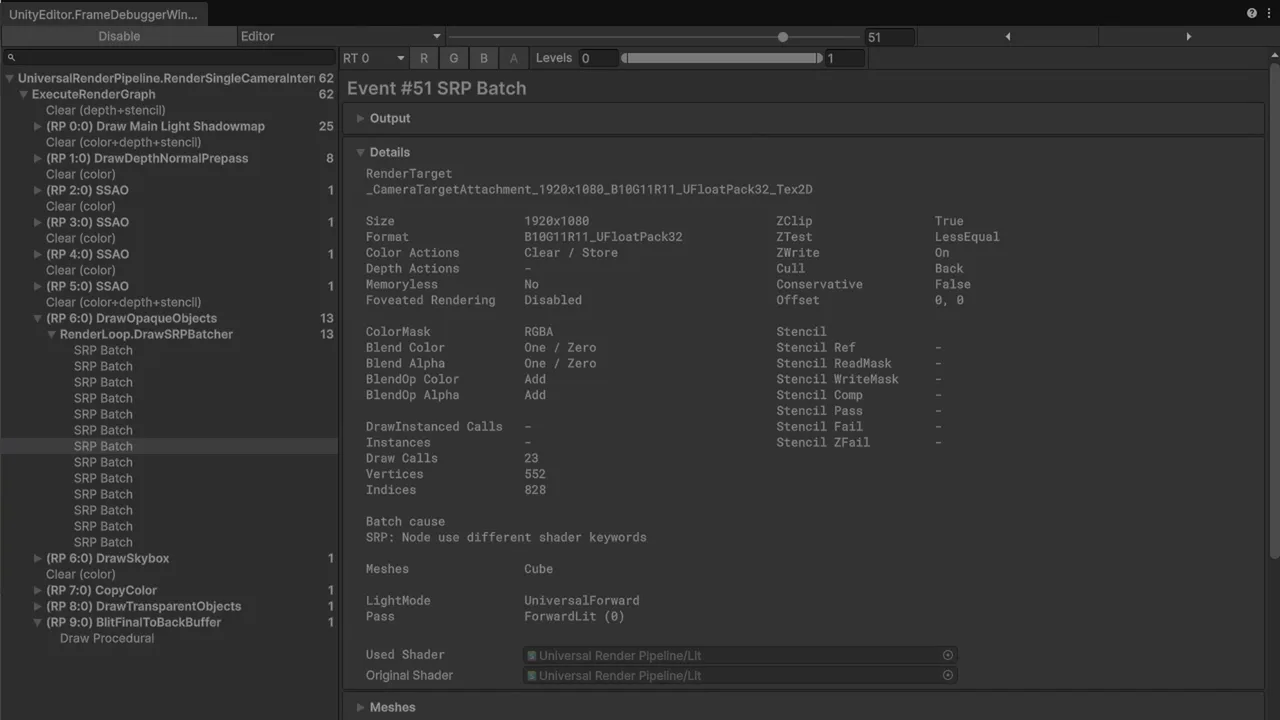
GPU Instancing
GPU instancing draws many copies of the same mesh with the same material in one call, with per-instance data like position and colour. Tick Enable GPU Instancing on the material. In URP, the SRP Batcher takes priority over instancing for regular renderers, so instancing matters most for:
- Drawing thousands of objects from code with
Graphics.RenderMeshInstanced(grass, debris, crowds) with no GameObjects at all. - Terrain trees and details (tick Draw Instanced on the Terrain).
- Particle systems using mesh particles.
// Draw 1,000 rocks with no GameObjects
[SerializeField] Mesh mesh;
[SerializeField] Material material;   // GPU Instancing enabled
Matrix4x4[] matrices = new Matrix4x4[1000];
RenderParams rp;

void Start()
{
    rp = new RenderParams(material);
    for (int i = 0; i < matrices.Length; i++)
        matrices[i] = Matrix4x4.TRS(Random.insideUnitSphere * 50f, Random.rotation, Vector3.one);
}

void Update() => Graphics.RenderMeshInstanced(rp, mesh, 0, matrices);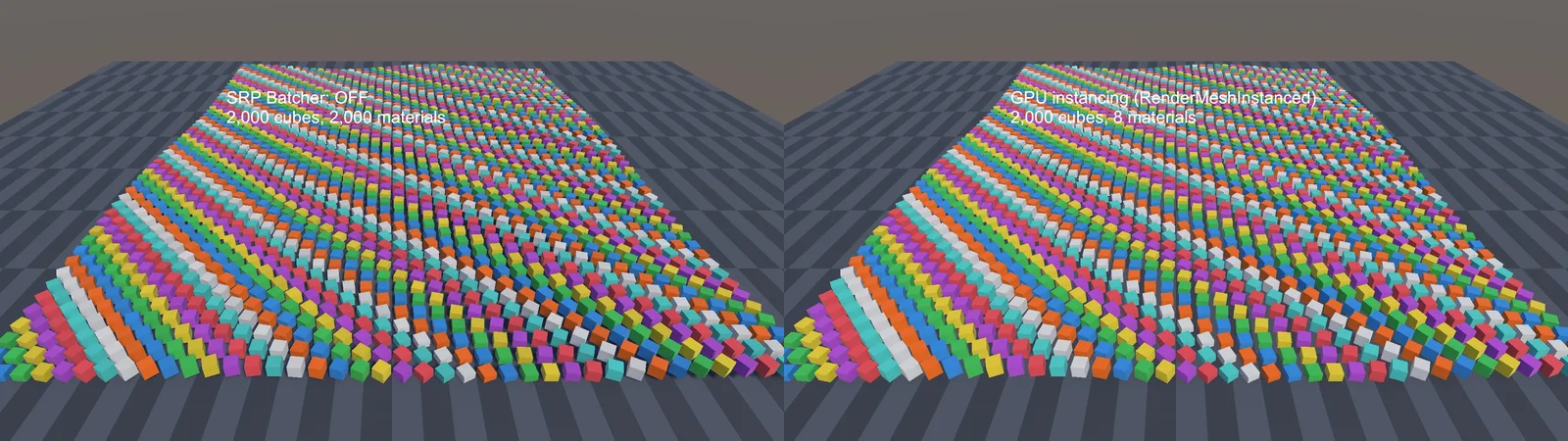
Static and Dynamic Batching
Static batching combines meshes of objects marked Static (Batching Static) into big shared buffers at build time. It cuts state changes for level geometry that never moves, at the cost of extra memory, and it can’t be culled per object as finely. In URP with the SRP Batcher on, the gains are smaller than they used to be. Test it rather than assuming.
Dynamic batching merges tiny moving meshes (under 300 vertices) on the CPU every frame. On modern hardware it often costs more than it saves, and it’s off by default in URP. Leave it off unless profiling on a low-end device proves otherwise.
You can also combine meshes yourself (Mesh.CombineMeshes, or tools in our Asset Store tools roundup like Mesh Baker) for clusters of props that always render together.
Fewer Materials: Atlases and Shared Shaders
Regardless of batching method, fewer unique materials and shader variants means fewer state changes:
- Texture atlases: pack many props’ textures into one sheet so they share a material. Essential for 2D (use Sprite Atlas assets, which let the 2D renderer batch sprites).
- Trim sheets and palette textures: low-poly games can colour everything from one small gradient texture.
- Standardize shaders: one Lit shader with consistent keywords instead of five custom variations.
- Beware
renderer.material: accessing it at runtime clones the material, creating a new unique one (and a leak). UsesharedMaterialwhen you don’t need a per-object copy.
🔧 Optimizing for weaker hardware?
Profiling on a mid-range laptop shows bottlenecks a high-end desktop hides. Our dev laptop guide lists good-value machines that make realistic test targets.
Which Technique When?
| Situation | Best tool |
|---|---|
| General URP scene with varied props | SRP Batcher + fewer shader variants |
| Many repeated meshes (forest, city), Unity 6 | GPU Resident Drawer |
| Thousands of tiny things without GameObjects | RenderMeshInstanced (instancing) |
| Non-moving level geometry on older/low-end targets | Static batching, or combined meshes |
| 2D sprites | Sprite Atlas + shared material |
| UI | Shared atlases, split canvases (see our UI guide) |
Troubleshooting
“SRP Batcher: not compatible” on a shader
A custom shader declares material properties outside the UnityPerMaterial CBUFFER, or the object uses a MaterialPropertyBlock. Fix the shader, or rebuild it in Shader Graph.
Batches didn’t drop after marking objects static
The objects use different materials, or the SRP Batcher was already handling them efficiently. Check SetPass calls and CPU time rather than batch count alone, and use the Frame Debugger’s reasons.
GPU Resident Drawer has no effect
BatchRendererGroup Variants isn’t set to Keep All, the renderer isn’t Forward+, the platform lacks compute support, or the objects use MaterialPropertyBlocks.
Frame Debugger says “different shader keywords”
Materials using the same shader have different features enabled. Align material settings (normal maps, emission, alpha clipping) across similar props.
Sprites aren’t batching
They’re on different textures or interleaved by sort order with sprites from other textures. Pack them into a Sprite Atlas and group sorting layers.
FAQ
How many draw calls is too many in Unity?
There’s no fixed number. As a rough guide, a few hundred batches on mobile and a few thousand on desktop. Judge by CPU render time in the Profiler.
What’s the difference between batches and SetPass calls?
Batches count submitted draws. SetPass calls count shader state changes, which are usually the more expensive part.
Does GPU instancing work with the SRP Batcher?
For regular renderers, the SRP Batcher takes priority. Instancing is used for procedural drawing, terrain details and via the GPU Resident Drawer.
Should I enable dynamic batching in URP?
Usually not. It costs CPU time each frame and the SRP Batcher covers most cases. Only enable it if profiling proves a gain.
Is static batching still useful in Unity 6?
Sometimes, especially on low-end targets, but test it. It uses extra memory and the SRP Batcher or GPU Resident Drawer may already do better.
Reader questions
Asked by readers of this article and answered by AI. Behavior can differ between Unity versions, so test in yours.



Leave a Reply