
Platformer movement is where many Unity developers write their first real gameplay code, and it’s surprisingly easy to make it feel bad. A character that slides on ice, jumps the same height no matter how long you hold the button, or ignores a jump pressed a fraction of a second before landing feels “off” even if players can’t say why. This Unity 2D platformer movement guide builds a Rigidbody2D controller step by step, then adds the small tricks that make commercial platformers feel responsive: coyote time, jump buffering, variable jump height and better gravity.
Scene and Rigidbody2D Setup
Create a player sprite and add these components:
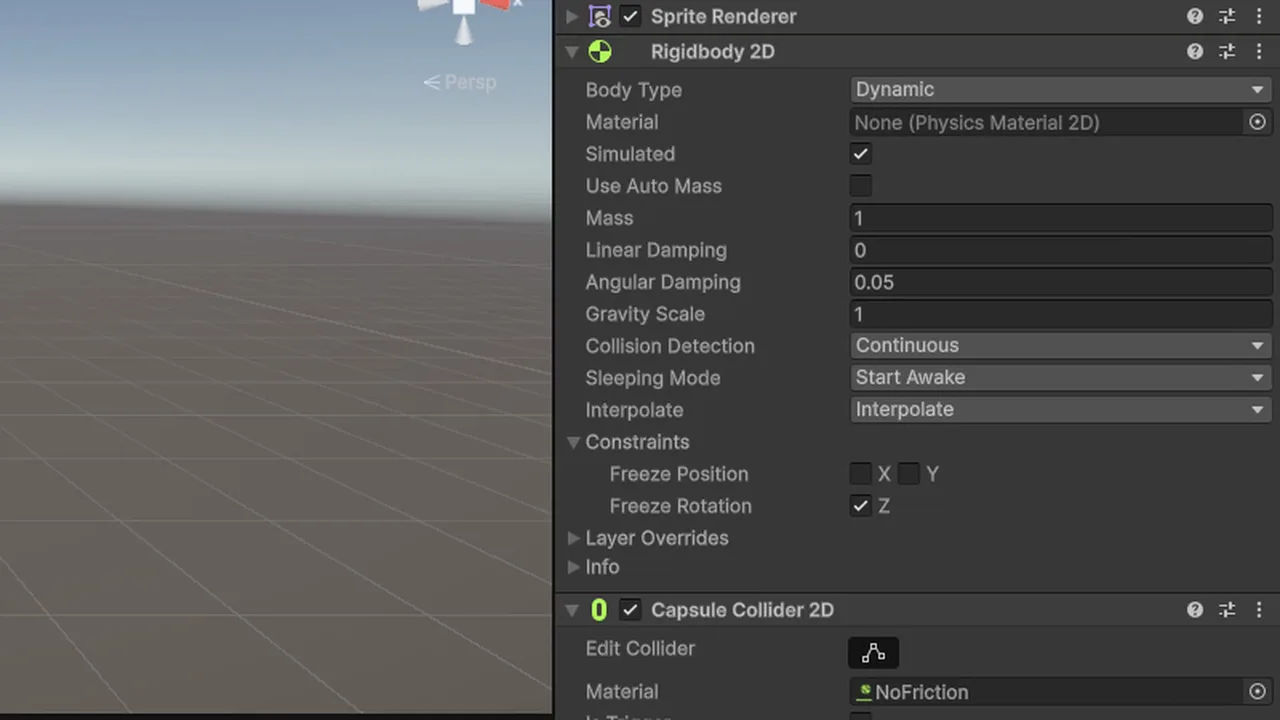
- Rigidbody2D: Body Type Dynamic, Collision Detection Continuous, Interpolate Interpolate, and tick Freeze Rotation Z so the player doesn’t topple over.
- CapsuleCollider2D: a capsule’s rounded bottom slides over small seams between tiles, whereas a box collider snags on them.
Give the ground a collider too (a TilemapCollider2D plus CompositeCollider2D works well, see our Tilemap and Rule Tile tutorial). Put the ground on a layer called Ground. We’ll use it for the ground check.
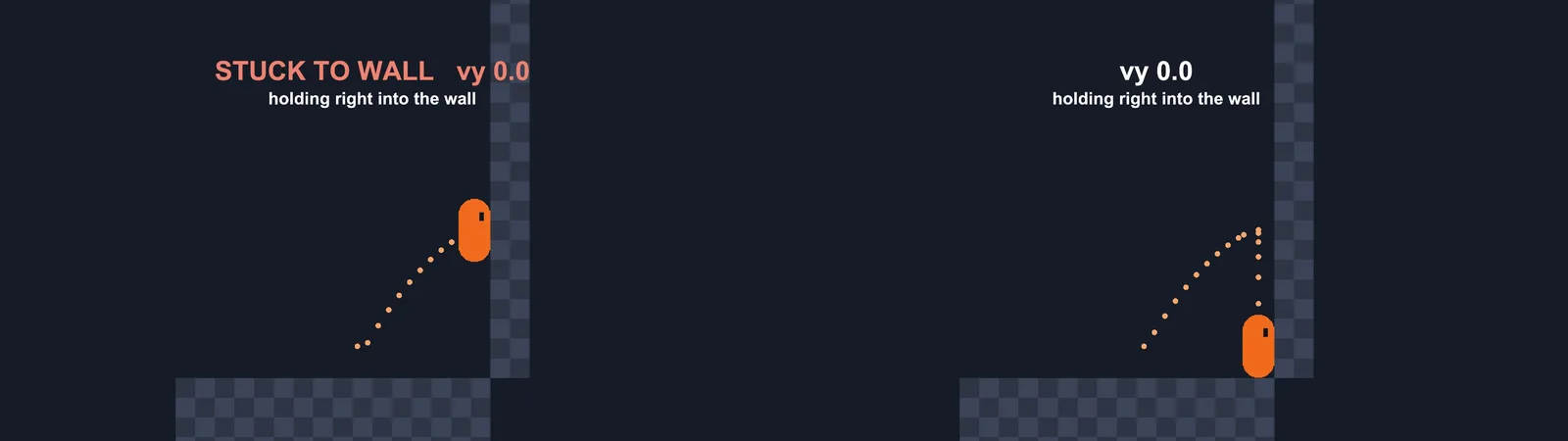
Finally, create a Physics Material 2D with Friction 0 and assign it to the player’s collider. Without it, the player sticks to walls when you hold a direction into them mid-air.
Horizontal Movement
Read input in Update and apply velocity in FixedUpdate. This example uses the Input System with an action asset that has a Move (Vector2) and Jump (Button) action. If you haven’t set that up, our new Input System guide covers it.
using UnityEngine;
using UnityEngine.InputSystem;

[RequireComponent(typeof(Rigidbody2D))]
public class PlatformerController : MonoBehaviour
{
    [SerializeField] float moveSpeed = 8f;
    [SerializeField] InputActionReference moveAction;

    Rigidbody2D rb;
    float inputX;

    void Awake() => rb = GetComponent<Rigidbody2D>();

    void Update()
    {
        inputX = moveAction.action.ReadValue<Vector2>().x;
    }

    void FixedUpdate()
    {
        rb.linearVelocity = new Vector2(inputX * moveSpeed, rb.linearVelocity.y);
    }
}
Note linearVelocity: in Unity 6 the old velocity property is obsolete. Keeping the existing y velocity is important. Overwriting it with zero would cancel gravity and jumping.
A Reliable Ground Check
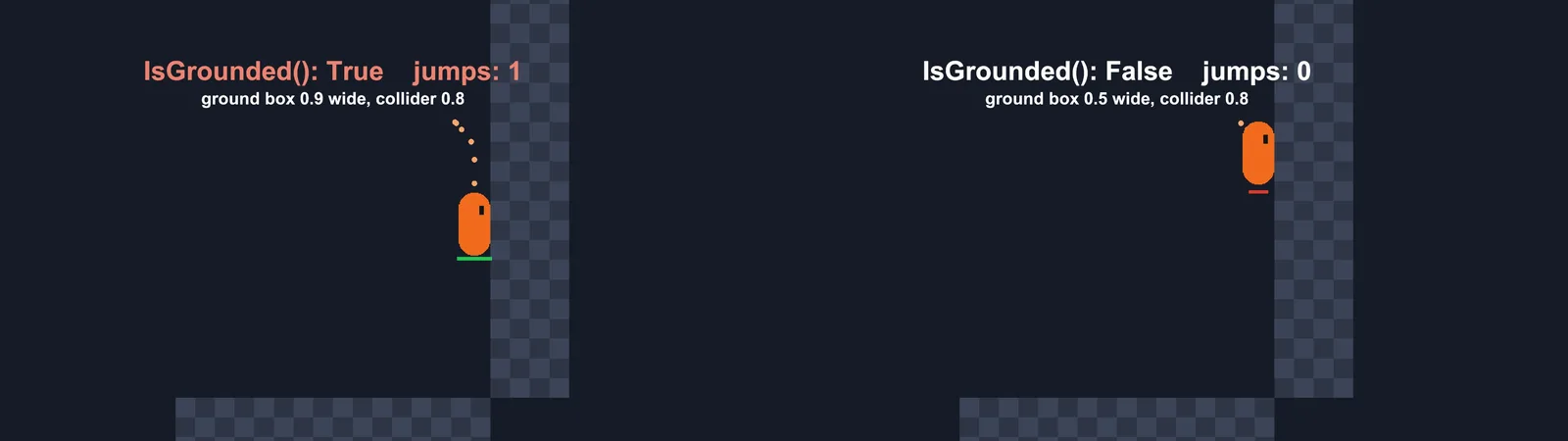
Most “can’t jump” and “double jump” bugs come from a bad ground check. Don’t use OnCollisionEnter2D with a bool, because touching a wall counts as a collision too. Instead, check a small box just under the feet:
[SerializeField] LayerMask groundMask;
[SerializeField] Vector2 groundBoxSize = new Vector2(0.5f, 0.05f);
[SerializeField] float groundBoxOffset = 0.02f;
CapsuleCollider2D col;

bool IsGrounded()
{
    Vector2 feet = new Vector2(col.bounds.center.x, col.bounds.min.y - groundBoxOffset);
    return Physics2D.OverlapBox(feet, groundBoxSize, 0f, groundMask);
}

void OnDrawGizmosSelected()
{
    if (col == null) col = GetComponent<CapsuleCollider2D>();
    Gizmos.color = Color.green;
    Gizmos.DrawWireCube(new Vector3(col.bounds.center.x, col.bounds.min.y - groundBoxOffset), groundBoxSize);
}
Make the box slightly narrower than the collider. If it’s as wide as the player, it touches walls you are pressed against and reports “grounded” while you slide down them. The gizmo lets you see it in the Scene view. A raycast also works (see our raycast tutorial), but a single centre ray misses when the player stands on a ledge edge.
Jumping
Set the vertical velocity directly instead of adding force. It gives exactly the same jump height every time, regardless of whether you were falling slightly:
[SerializeField] float jumpVelocity = 14f;
[SerializeField] InputActionReference jumpAction;

void Update()
{
    inputX = moveAction.action.ReadValue<Vector2>().x;
    if (jumpAction.action.WasPressedThisFrame() && IsGrounded())
        rb.linearVelocity = new Vector2(rb.linearVelocity.x, jumpVelocity);
}
Want to design jumps by height instead of velocity? Use v = sqrt(2 * g * h): jumpVelocity = Mathf.Sqrt(2f * Mathf.Abs(Physics2D.gravity.y * rb.gravityScale) * jumpHeight).
Coyote Time and Jump Buffering
These two tricks make the controller forgive human timing:
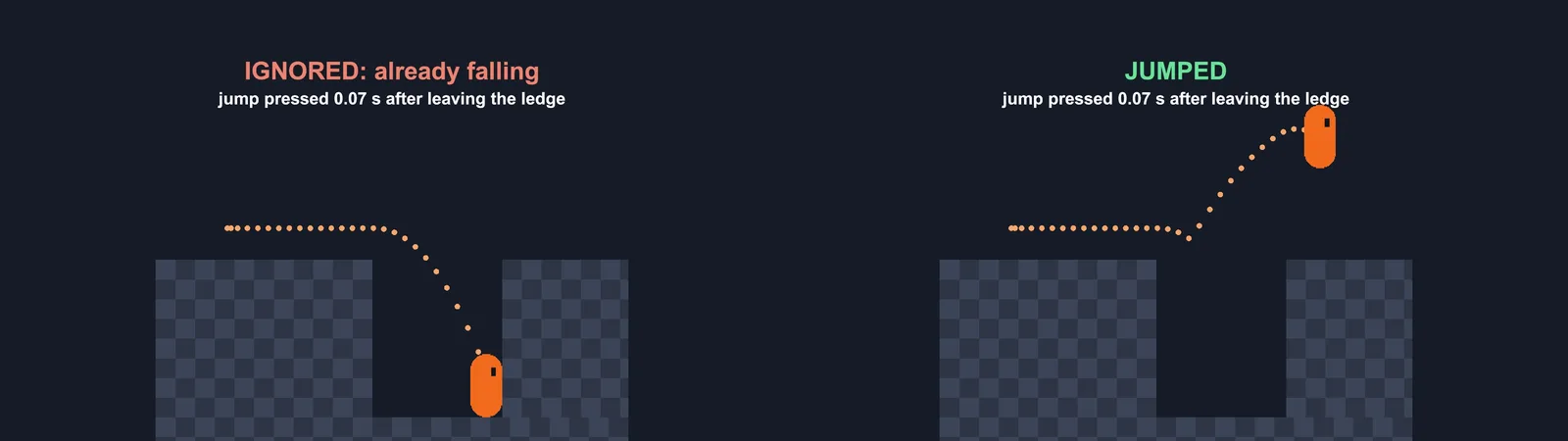
- Coyote time lets the player jump for a short window (around 0.1 s) after running off a ledge. Without it, players press jump “on the edge” and nothing happens.
- Jump buffering remembers a jump pressed just before landing and performs it the moment the player touches down.
[SerializeField] float coyoteTime = 0.1f;
[SerializeField] float jumpBufferTime = 0.12f;
float coyoteTimer, bufferTimer;

void Update()
{
    inputX = moveAction.action.ReadValue<Vector2>().x;

    coyoteTimer = IsGrounded() ? coyoteTime : coyoteTimer - Time.deltaTime;
    bufferTimer = jumpAction.action.WasPressedThisFrame() ? jumpBufferTime : bufferTimer - Time.deltaTime;

    if (bufferTimer > 0f && coyoteTimer > 0f)
    {
        rb.linearVelocity = new Vector2(rb.linearVelocity.x, jumpVelocity);
        bufferTimer = 0f;
        coyoteTimer = 0f;   // prevents a second jump during the coyote window
    }
}
Zeroing both timers after the jump is what stops a sneaky double jump.
Variable Jump Height and Better Falling
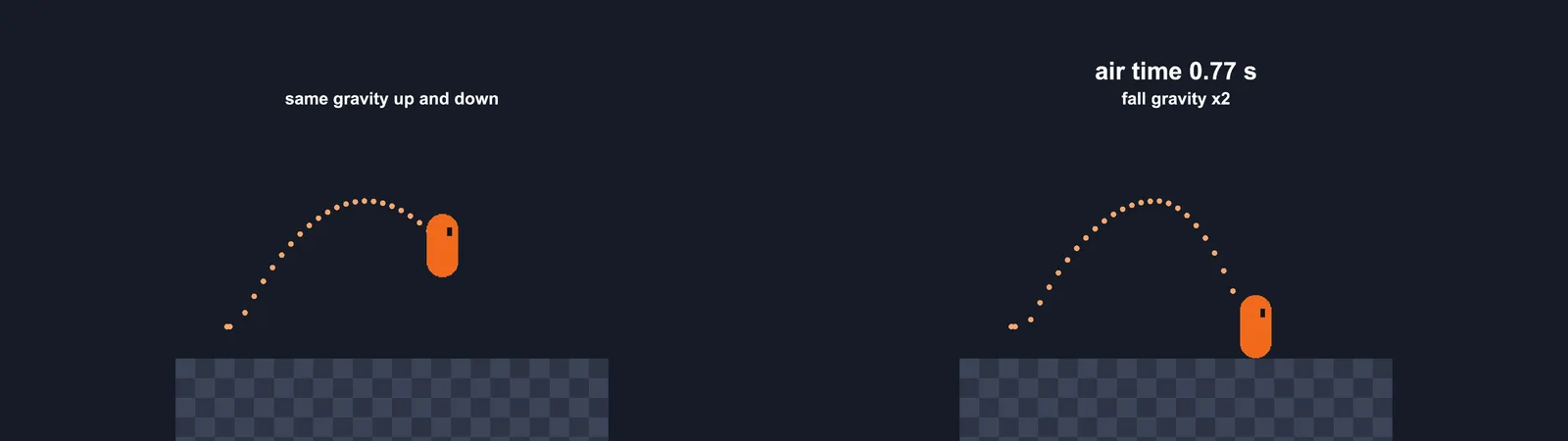
A floaty jump comes from symmetrical gravity: the player rises and falls at the same rate. Good platformers fall faster than they rise, and cut the jump short when the button is released.
[SerializeField] float fallGravityMultiplier = 2f;
[SerializeField] float lowJumpMultiplier = 3f;
[SerializeField] float maxFallSpeed = 20f;
float baseGravity;

void Awake()
{
    rb = GetComponent<Rigidbody2D>();
    col = GetComponent<CapsuleCollider2D>();
    baseGravity = rb.gravityScale;
}

void FixedUpdate()
{
    rb.linearVelocity = new Vector2(inputX * moveSpeed, rb.linearVelocity.y);

    if (rb.linearVelocity.y < 0f)
        rb.gravityScale = baseGravity * fallGravityMultiplier;
    else if (rb.linearVelocity.y > 0f && !jumpAction.action.IsPressed())
        rb.gravityScale = baseGravity * lowJumpMultiplier;
    else
        rb.gravityScale = baseGravity;

    if (rb.linearVelocity.y < -maxFallSpeed)
        rb.linearVelocity = new Vector2(rb.linearVelocity.x, -maxFallSpeed);
}
Tapping jump now gives a hop, holding it gives a full jump, and the fall feels weighty. The max fall speed clamp stops the player tunnelling through thin platforms after long drops.
Acceleration and Deceleration
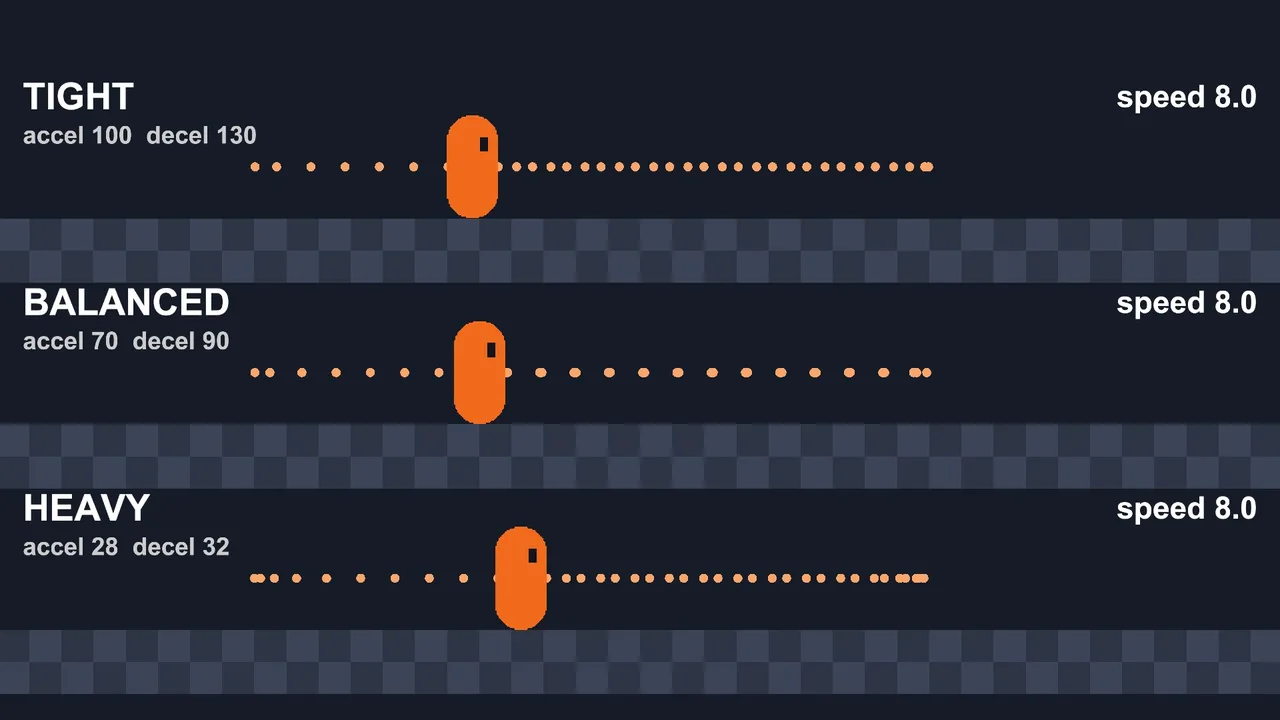
Instant full speed feels twitchy. Instant stopping is usually fine for precise platformers, but a little acceleration adds weight. Use Mathf.MoveTowards on the x velocity:
[SerializeField] float acceleration = 70f;
[SerializeField] float deceleration = 90f;
[SerializeField] float airControl = 0.6f;

void ApplyHorizontal()
{
    float target = inputX * moveSpeed;
    float rate = Mathf.Abs(target) > 0.01f ? acceleration : deceleration;
    if (!IsGrounded()) rate *= airControl;
    float x = Mathf.MoveTowards(rb.linearVelocity.x, target, rate * Time.fixedDeltaTime);
    rb.linearVelocity = new Vector2(x, rb.linearVelocity.y);
}| Feel | Acceleration | Deceleration | Air control |
|---|---|---|---|
| Tight, precise (Celeste-like) | 90+ | 120+ | 0.8–1 |
| Balanced | 60–80 | 80–100 | 0.6 |
| Heavy, momentum-based | 20–35 | 25–40 | 0.3–0.5 |
🎮 Skip the boilerplate?
If you’d rather spend time on level design than controller code, a few Asset Store controllers are well worth the price. We list the ones indie devs actually use.
The Full Script
using UnityEngine;
using UnityEngine.InputSystem;

[RequireComponent(typeof(Rigidbody2D), typeof(CapsuleCollider2D))]
public class PlatformerController : MonoBehaviour
{
    [Header("Input")]
    [SerializeField] InputActionReference moveAction, jumpAction;
    [Header("Run")]
    [SerializeField] float moveSpeed = 8f, acceleration = 70f, deceleration = 90f, airControl = 0.6f;
    [Header("Jump")]
    [SerializeField] float jumpVelocity = 14f, coyoteTime = 0.1f, jumpBufferTime = 0.12f;
    [SerializeField] float fallGravityMultiplier = 2f, lowJumpMultiplier = 3f, maxFallSpeed = 20f;
    [Header("Ground")]
    [SerializeField] LayerMask groundMask;
    [SerializeField] Vector2 groundBoxSize = new Vector2(0.5f, 0.05f);

    Rigidbody2D rb;
    CapsuleCollider2D col;
    float inputX, coyoteTimer, bufferTimer, baseGravity;
    bool grounded;

    void Awake()
    {
        rb = GetComponent<Rigidbody2D>();
        col = GetComponent<CapsuleCollider2D>();
        baseGravity = rb.gravityScale;
    }

    void OnEnable() { moveAction.action.Enable(); jumpAction.action.Enable(); }

    void Update()
    {
        inputX = moveAction.action.ReadValue<Vector2>().x;
        grounded = Physics2D.OverlapBox(new Vector2(col.bounds.center.x, col.bounds.min.y - 0.02f), groundBoxSize, 0f, groundMask);

        coyoteTimer = grounded ? coyoteTime : coyoteTimer - Time.deltaTime;
        bufferTimer = jumpAction.action.WasPressedThisFrame() ? jumpBufferTime : bufferTimer - Time.deltaTime;

        if (bufferTimer > 0f && coyoteTimer > 0f)
        {
            rb.linearVelocity = new Vector2(rb.linearVelocity.x, jumpVelocity);
            bufferTimer = coyoteTimer = 0f;
        }
    }

    void FixedUpdate()
    {
        float target = inputX * moveSpeed;
        float rate = (Mathf.Abs(target) > 0.01f ? acceleration : deceleration) * (grounded ? 1f : airControl);
        float vx = Mathf.MoveTowards(rb.linearVelocity.x, target, rate * Time.fixedDeltaTime);

        if (rb.linearVelocity.y < 0f) rb.gravityScale = baseGravity * fallGravityMultiplier;
        else if (rb.linearVelocity.y > 0f && !jumpAction.action.IsPressed()) rb.gravityScale = baseGravity * lowJumpMultiplier;
        else rb.gravityScale = baseGravity;

        rb.linearVelocity = new Vector2(vx, Mathf.Max(rb.linearVelocity.y, -maxFallSpeed));
    }
}
To flip the sprite, set spriteRenderer.flipX = inputX < 0 whenever inputX isn’t zero. To drive animations, pass Mathf.Abs(rb.linearVelocity.x) and grounded into Animator parameters. If they don’t play, see Animator not playing: fixes.
Troubleshooting
The player sticks to walls in mid-air
Friction between the player and the wall is holding it up. Assign a Physics Material 2D with Friction 0 to the player’s collider (and keep friction on the ground if you want).
The player can jump infinitely / double jumps
The ground check overlaps the player’s own collider, or touches walls. Make sure the player isn’t on the Ground layer, and narrow the check box. Also zero the coyote timer after jumping.
Jump input is sometimes ignored
You’re reading WasPressedThisFrame inside FixedUpdate. FixedUpdate doesn’t run every frame, so presses get lost. Read input in Update, as above.
The player catches on tile edges
Each tile has its own collider. Add a CompositeCollider2D to the Tilemap (set its Rigidbody2D to Static) and tick Used By Composite on the TilemapCollider2D. A capsule collider helps as well.
Movement is jittery
Turn on Interpolate on the Rigidbody2D and never move the player with transform.position. Our Rigidbody jitter fix covers camera-related jitter too.
FAQ
Should I use Rigidbody2D or a kinematic controller for a platformer?
Rigidbody2D is easiest and works for most games. Kinematic controllers that do their own collision with casts give pixel-perfect control and are common in precision platformers, but take much more code.
What is coyote time?
A short grace period, usually 0.08 to 0.15 seconds, during which the player can still jump after walking off a ledge. It makes jumps feel fair.
Why use linearVelocity instead of AddForce for jumping?
Setting velocity gives a consistent jump height regardless of current vertical speed. AddForce adds to whatever velocity already exists, so jumps vary.
How do I stop the player sliding down slopes?
When grounded with no input, set gravityScale to 0 and zero the velocity, or use a high-friction material while idle and zero friction while moving.
Can I use the old Input class instead?
Yes, if Active Input Handling is set to Both or Input Manager. Replace the actions with Input.GetAxisRaw(“Horizontal”) and Input.GetButtonDown(“Jump”).
Reader questions
Asked by readers of this article and answered by AI. Behavior can differ between Unity versions, so test in yours.


Leave a Reply