
“It works if I move this line to Start.” “It’s null the first frame, then fine.” “It works in one scene but not when loaded from the menu.” Bugs like these almost always come down to Unity’s execution order: the sequence in which Awake, OnEnable, Start, Update and friends run, across many scripts. This guide explains Awake vs Start and the full MonoBehaviour lifecycle in plain terms, which method to use for what, how order works between scripts, and how to fix the classic initialization bugs.
Quick answer
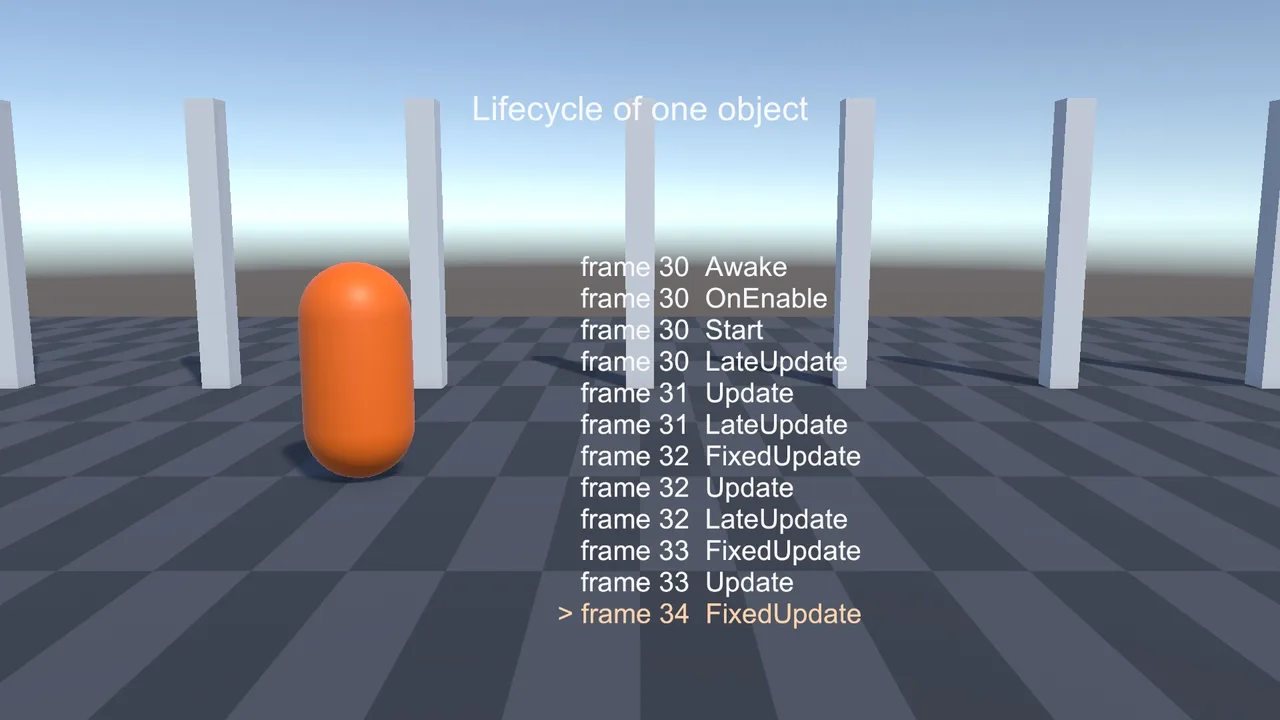
Awake runs first, as soon as the object is loaded or instantiated, even if the script is disabled. Start runs later, just before the object’s first Update, and only if the script is enabled. Order: Awake, OnEnable, Start, then FixedUpdate / Update / LateUpdate each frame. Use Awake to set up the object itself and Start for anything that talks to other objects.
The Lifecycle at a Glance
For each active, enabled script, Unity calls these methods in this order:
| Method | When | Typical use |
|---|---|---|
Awake |
Once, when the object is loaded or instantiated (even if the script is disabled) | Cache your own components, set up internal state |
OnEnable |
Each time the script becomes enabled and active | Subscribe to events |
Start |
Once, before the script’s first Update (only if enabled) | Talk to other objects, which are initialized by now |
FixedUpdate |
Every physics step (0, 1 or several times per frame) | Rigidbody forces and velocity |
Update |
Once per frame | Input, gameplay logic |
LateUpdate |
Once per frame, after all Updates | Cameras, things that follow other things |
OnDisable |
When disabled or deactivated (and before destroy) | Unsubscribe from events |
OnDestroy |
When destroyed, or when the scene unloads | Final cleanup |
There are more (OnValidate, Reset, OnApplicationPause, physics callbacks like OnCollisionEnter, rendering callbacks), but these eight cover nearly every bug.
Awake vs Start
The rule that prevents most initialization bugs:
- Awake: set up yourself. Cache
GetComponentresults, create lists, set default values. Don’t rely on other objects being ready. - Start: connect to others. By the time any Start runs, every object in the scene has already run Awake. So it’s safe to read another object’s state here.
public class Player : MonoBehaviour
{
    Rigidbody rb;
    Health health;

    void Awake()
    {
        rb = GetComponent<Rigidbody>();      // my own components
        health = GetComponent<Health>();
    }

    void Start()
    {
        // GameManager.Instance was set in GameManager.Awake, so it's safe here
        GameManager.Instance.RegisterPlayer(this);
    }
}
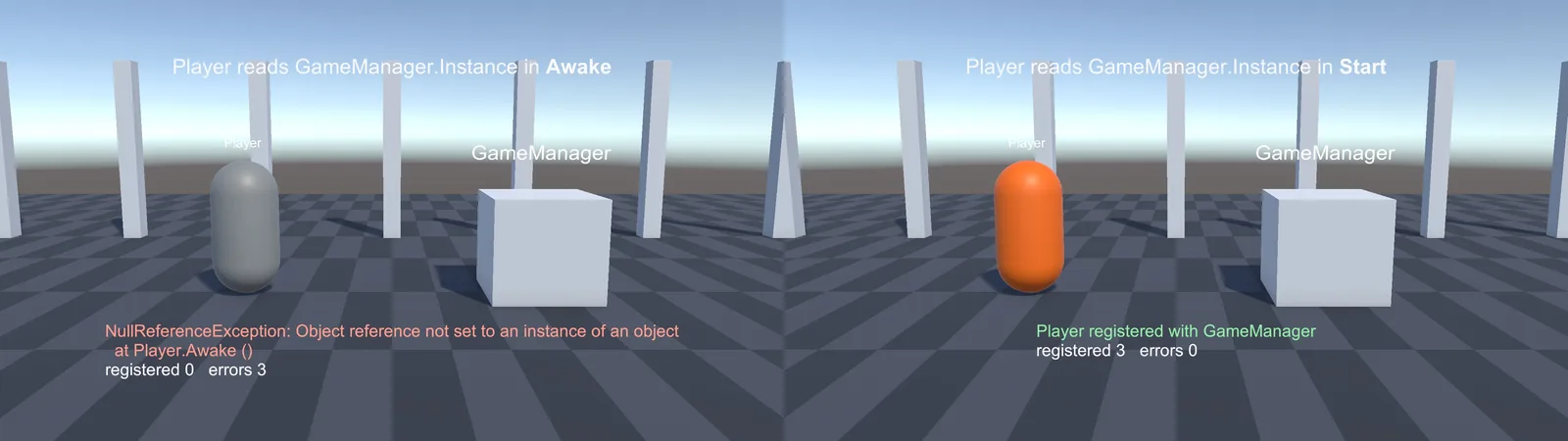
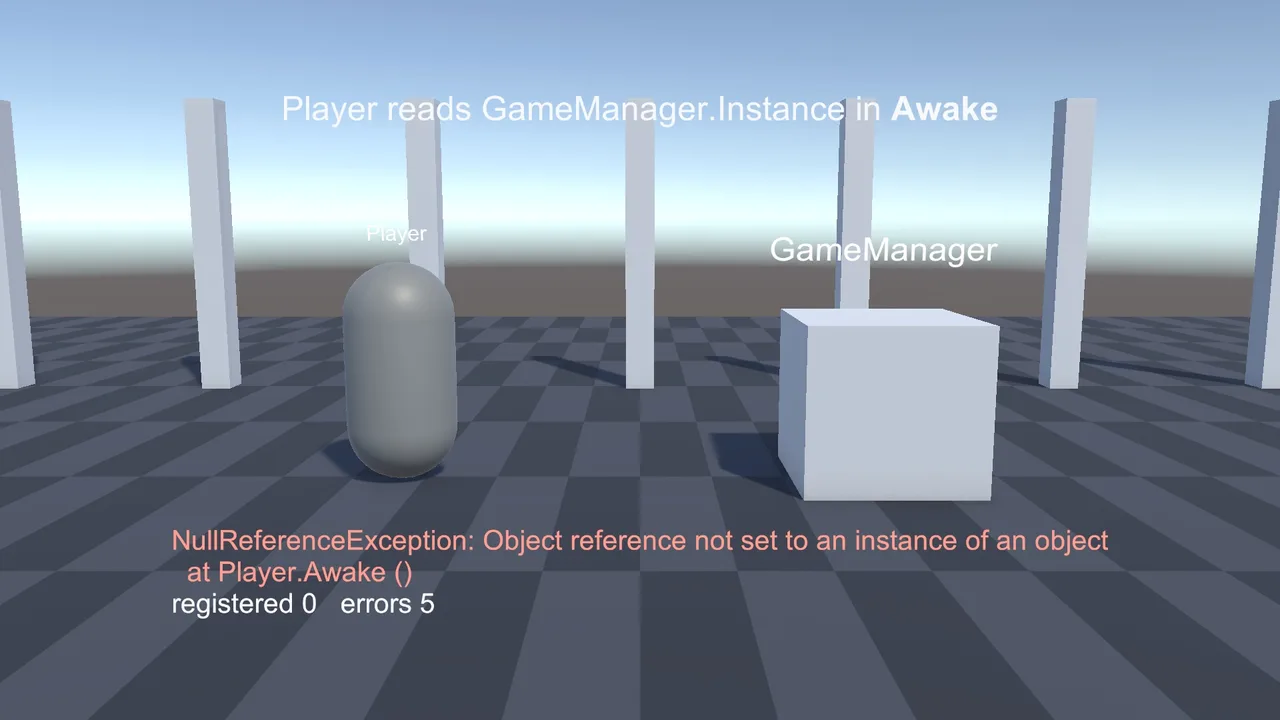
If Player called GameManager.Instance in Awake, it would work or fail at random depending on which Awake ran first. That’s the classic “null only sometimes” bug, and it often leads to a NullReferenceException that’s hard to reproduce.
Two more differences: Awake runs even if the script is disabled (as long as the GameObject is active), while Start waits until the script is enabled. And Start can be a coroutine (IEnumerator Start()) or async (async Awaitable Start()) to wait before continuing.
OnEnable and OnDisable
OnEnable runs after Awake but before Start, and again every time the object is re-enabled. That makes the pair perfect for event subscriptions:
void OnEnable()  => health.Died += HandleDeath;
void OnDisable() => health.Died -= HandleDeath;
This stays correct when objects are pooled (disabled and re-enabled instead of destroyed), and it never leaves a dangling subscription. See our C# events guide for more.
The catch: because OnEnable runs before Start, subscribing to another object’s event in OnEnable can fail if that object’s Awake hasn’t run yet. Subscribing to fields you cached in your own Awake is safe. For other objects, subscribe in Start, or make sure the publisher initializes in its field declarations.
Update, FixedUpdate and LateUpdate
- FixedUpdate runs at a fixed rate (50 Hz by default) and belongs to physics. At high frame rates it runs on some frames and not others, and at low frame rates several times in one frame. Don’t read one-shot input like
WasPressedThisFramethere, or presses get lost. - Update runs once per frame. Read input and run most gameplay here, scaling movement by
Time.deltaTime. - LateUpdate runs after every Update. Use it for cameras and anything that must react to where other objects ended up this frame.
Mixing these up causes jitter: a camera in Update following a Rigidbody moved in FixedUpdate. Our Rigidbody jitter fix covers it, and the CharacterController vs Rigidbody guide shows which loop each controller belongs in.
Order Between Scripts
Unity guarantees the order of methods within one script, but not the order of the same method across different scripts. If ScriptA.Awake and ScriptB.Awake both exist, either can run first, and it can change between the Editor and a build.
Ways to control it, from best to last resort:
- Follow the Awake/Start rule, which removes most dependencies.
- Initialize explicitly: a bootstrap or manager calls
Init()on systems in the order you choose. It’s clear and testable. [DefaultExecutionOrder(-100)]on a class makes it run earlier than default (0). Higher numbers run later. Good for core managers.- Project Settings > Script Execution Order does the same through the UI, though attributes are easier to see in code.
[DefaultExecutionOrder(-100)]
public class GameManager : MonoBehaviour
{
    public static GameManager Instance { get; private set; }
    void Awake() => Instance = this;
}
What Happens When You Instantiate
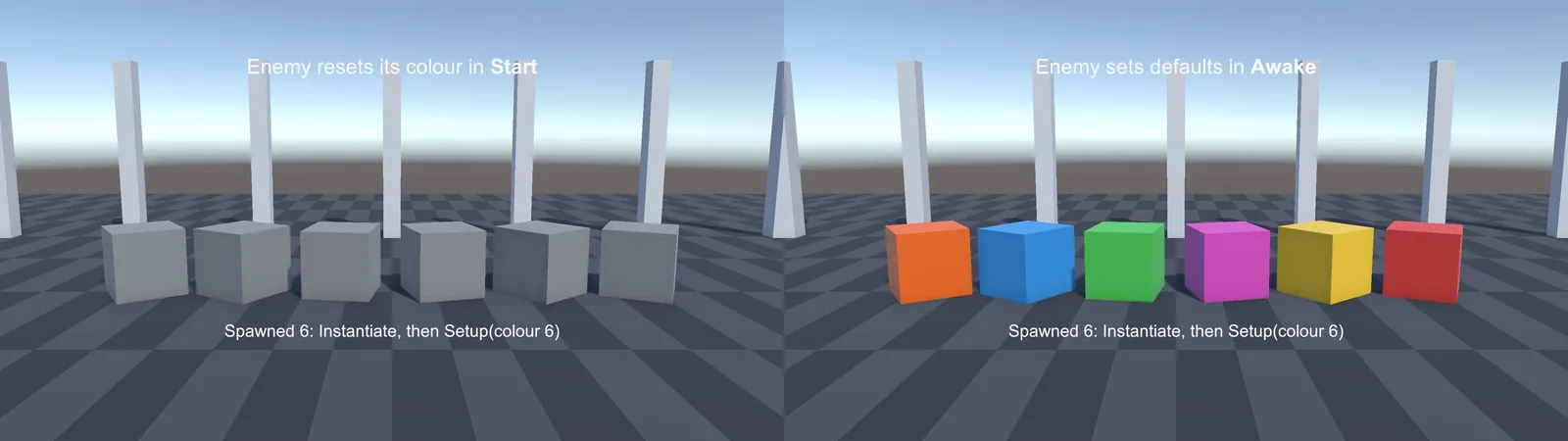
A common surprise: Awake and OnEnable run immediately inside Instantiate, before the next line of your code. Start runs later, just before that object’s first Update.
var enemy = Instantiate(enemyPrefab);   // enemy.Awake() and OnEnable() run HERE
enemy.Setup(target);                   // runs after Awake, but BEFORE enemy.Start()
That ordering is useful: put defaults in Awake, pass data in with a Setup method right after Instantiate, and use the data in Start. If you set data in Awake, your Setup call overrides it. If you use data in Awake, it isn’t set yet.
The same applies to scenes loaded with LoadSceneAsync: every object in the new scene runs Awake and OnEnable when the scene activates (more in our async scene loading guide).
Destroy, OnDestroy and Quitting
Destroy(obj)doesn’t destroy immediately. It happens at the end of the frame, so the object still exists (and its Update may finish) for the rest of the frame. Check a flag if that matters.- OnDisable runs before OnDestroy.
- When the scene unloads or the game quits, every object gets OnDisable and OnDestroy in no guaranteed order. Accessing a singleton in OnDestroy can throw because it’s already gone. Guard with null checks (
if (GameManager.Instance) ...). OnApplicationQuitruns before objects are destroyed on quit, which makes it a good place for a final save. On mobile, preferOnApplicationPause(true), because apps are often killed without a quit event (see save systems).
📚 Want to really understand Unity’s engine loop?
A good book on game programming patterns explains game loops, update methods and component systems in a way that makes Unity’s design click.
Troubleshooting
A reference is null in Awake but fine in Start
You’re reading another object that initializes in its own Awake. Move the read to Start, or give the other script an earlier [DefaultExecutionOrder].
Start never runs
The script is disabled, or the GameObject is inactive. Start only runs once the script is enabled and the object is active. Awake has the same requirement for the GameObject.
Data I set after Instantiate gets overwritten
Your script resets that data in Start, which runs after your Setup call. Set defaults in Awake or field initializers instead.
Works in the Editor, broken in the build
Your code relied on an unspecified order between scripts that happened to work in the Editor. Make the dependency explicit with Start, an Init method, or execution order.
MissingReferenceException when stopping Play mode
OnDisable/OnDestroy touches an object that was already destroyed during teardown. Null-check before using other objects in cleanup methods.
FAQ
What’s the difference between Awake and Start in Unity?
Awake runs first, as soon as the object loads, even if the script is disabled. Start runs later, before the first Update and only if enabled. Use Awake for self-setup and Start for interacting with other objects.
Does OnEnable run before Start?
Yes. The order is Awake, then OnEnable, then Start. OnEnable also runs again each time the object is re-enabled.
Which script’s Awake runs first?
It’s not guaranteed. Use DefaultExecutionOrder or Script Execution Order settings, or avoid cross-script dependencies in Awake.
Does Awake run when I call Instantiate?
Yes, immediately, inside the Instantiate call, along with OnEnable. Start runs later.
Should I use Update or FixedUpdate?
FixedUpdate for physics (Rigidbody forces and velocity), Update for input and most gameplay, and LateUpdate for cameras.
Reader questions
Asked by readers of this article and answered by AI. Behavior can differ between Unity versions, so test in yours.



Leave a Reply