

Rotation is the part of Unity that makes experienced programmers feel like beginners. You set transform.rotation.x = 90 and nothing happens, or your Euler angles snap to strange values, or the object spins the long way round. The cause is almost always the same: Unity stores rotations as quaternions. This guide explains Unity rotation and quaternions without the heavy maths, then shows the handful of methods you actually need: LookRotation, Slerp, RotateTowards, Euler and AngleAxis.
Why Unity Uses Quaternions
The Inspector shows rotation as three Euler angles (X, Y, Z degrees), but internally transform.rotation is a Quaternion: four numbers (x, y, z, w) that encode an axis and an angle. Quaternions avoid gimbal lock (losing an axis when two line up), interpolate smoothly, and combine cheaply.
The key rule: never edit quaternion x, y, z, w directly. They are not angles. transform.rotation.x of 0.707 doesn’t mean 0.707 degrees. Always create quaternions with Unity’s helper methods.
| Method | What it creates |
|---|---|
Quaternion.Euler(x, y, z) |
A rotation from degrees |
Quaternion.AngleAxis(angle, axis) |
Rotate angle degrees around an axis |
Quaternion.LookRotation(forward, up) |
A rotation that faces a direction |
Quaternion.FromToRotation(a, b) |
The rotation that turns vector a into vector b |
Quaternion.identity |
No rotation |
Quaternion.Inverse(q) |
The opposite rotation |
Euler Angles: When They’re Fine
Setting a rotation from angles is perfectly fine:
transform.rotation = Quaternion.Euler(0f, 90f, 0f);   // face +X
transform.eulerAngles = new Vector3(0f, 90f, 0f);     // same thing
transform.localEulerAngles = new Vector3(-30f, 0f, 0f); // tilt relative to parent
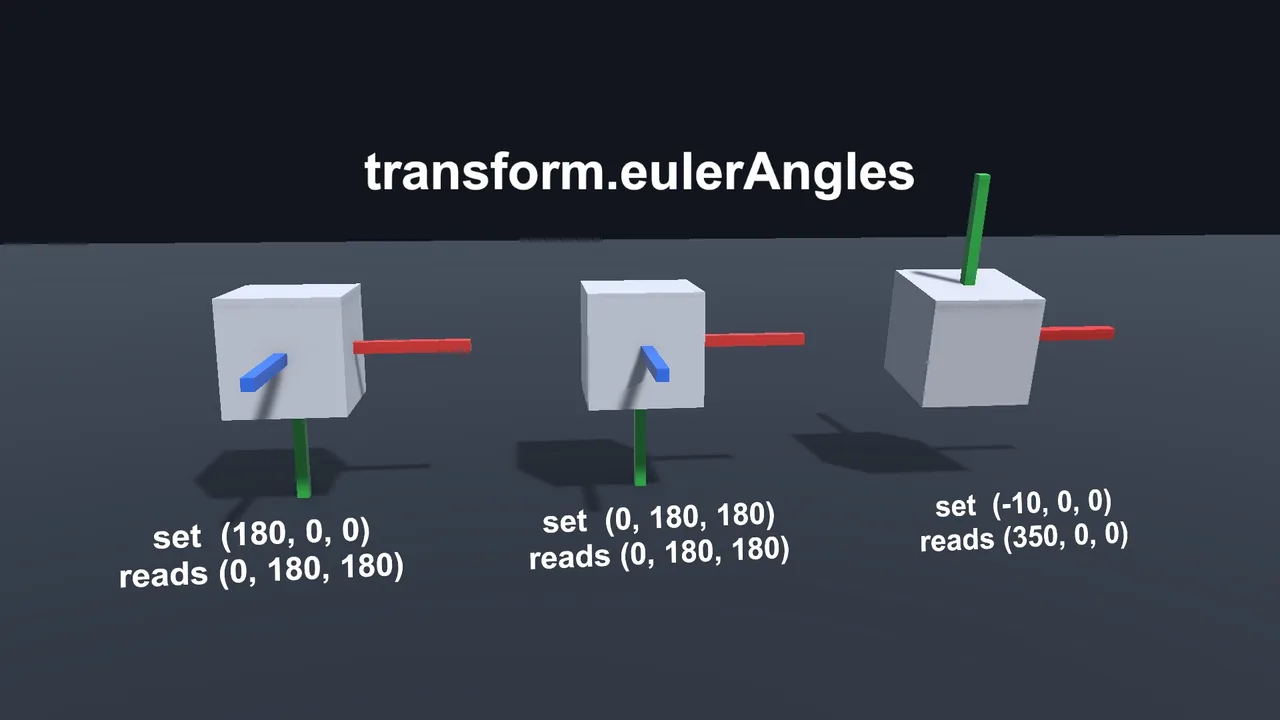
What’s not reliable is reading Euler angles back and doing maths on them. The same orientation has many Euler representations, so after setting (180, 0, 0) you may read back (0, 180, 180). Values also wrap: -10 comes back as 350. If you need to track an angle, such as camera pitch, keep it in your own float and build the rotation from it each frame (shown below).
Rotating an Object Every Frame
[SerializeField] float degreesPerSecond = 90f;

void Update()
{
    transform.Rotate(0f, degreesPerSecond * Time.deltaTime, 0f);            // local axes
    // transform.Rotate(Vector3.up, degreesPerSecond * Time.deltaTime, Space.World); // world up
}
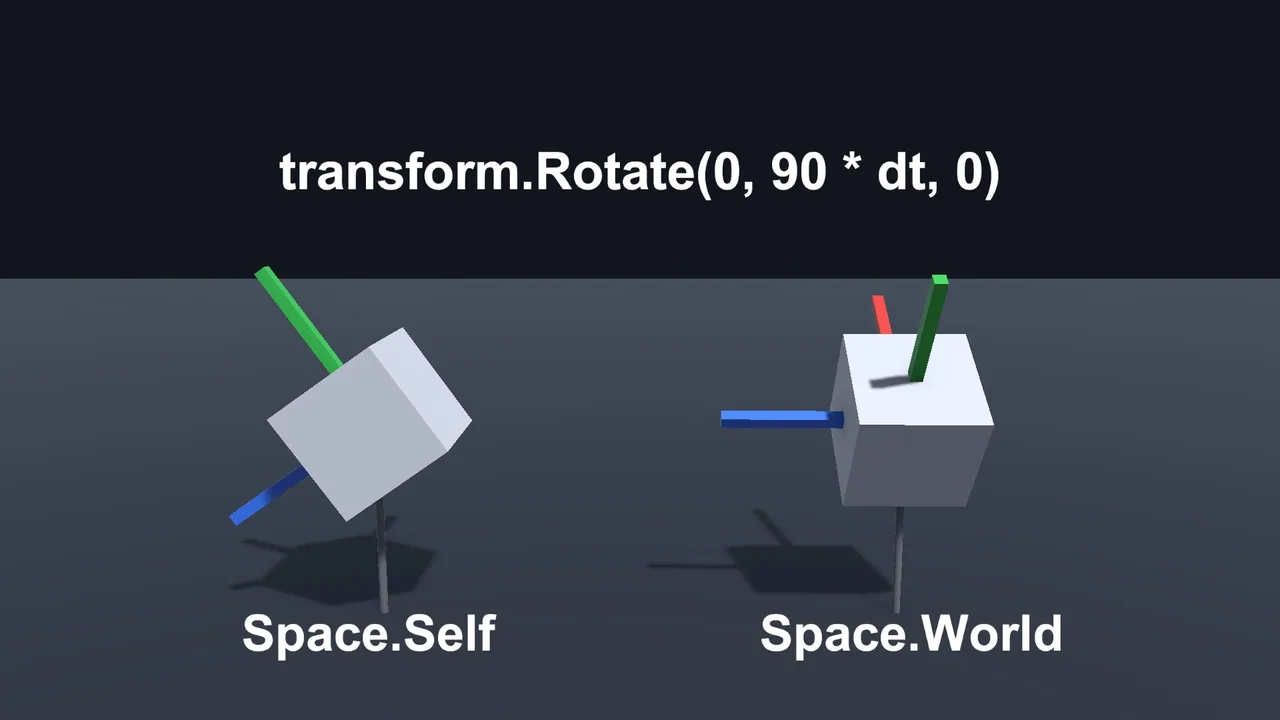
Rotate uses local space by default, so a tilted object spins around its own tilted up axis. Pass Space.World to spin around the world’s up axis. For an orbit around a point, use transform.RotateAround(pivot, Vector3.up, angle).
For Rigidbodies, rotate through physics instead: rb.MoveRotation(rb.rotation * Quaternion.Euler(0, speed * Time.fixedDeltaTime, 0)) in FixedUpdate, or set rb.angularVelocity.
Facing a Target: LookRotation
To make a turret, enemy or camera face something, build a direction and pass it to LookRotation:
Vector3 dir = target.position - transform.position;
transform.rotation = Quaternion.LookRotation(dir);
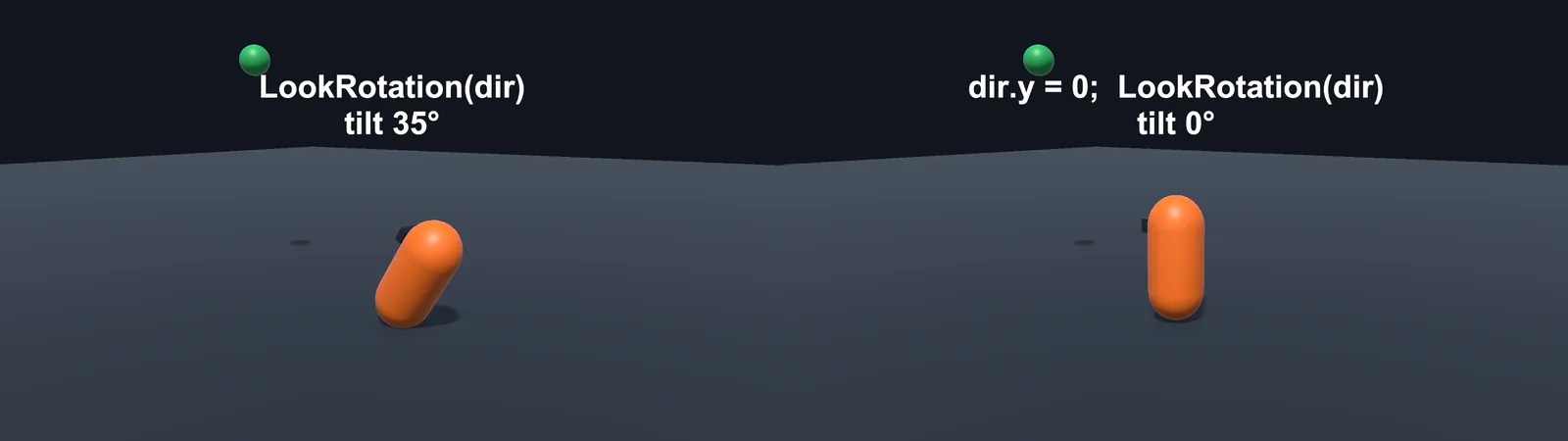
For characters that should only turn left and right (not tip forward when the target is higher), flatten the direction first:
Vector3 dir = target.position - transform.position;
dir.y = 0f;
if (dir.sqrMagnitude > 0.0001f)
    transform.rotation = Quaternion.LookRotation(dir);
The zero check matters: LookRotation(Vector3.zero) logs “Look rotation viewing vector is zero”. transform.LookAt(target) is a shortcut for the unflattened version.
Smooth Rotation: Slerp and RotateTowards
Snapping to face a target looks robotic. Two options:
// Constant turn speed in degrees per second (predictable, arrives exactly)
[SerializeField] float turnSpeed = 360f;
Quaternion targetRot = Quaternion.LookRotation(dir);
transform.rotation = Quaternion.RotateTowards(transform.rotation, targetRot, turnSpeed * Time.deltaTime);

// Ease-out turn (fast at first, then gentle), framerate-independent
[SerializeField] float sharpness = 10f;
transform.rotation = Quaternion.Slerp(transform.rotation, targetRot, 1f - Mathf.Exp(-sharpness * Time.deltaTime));
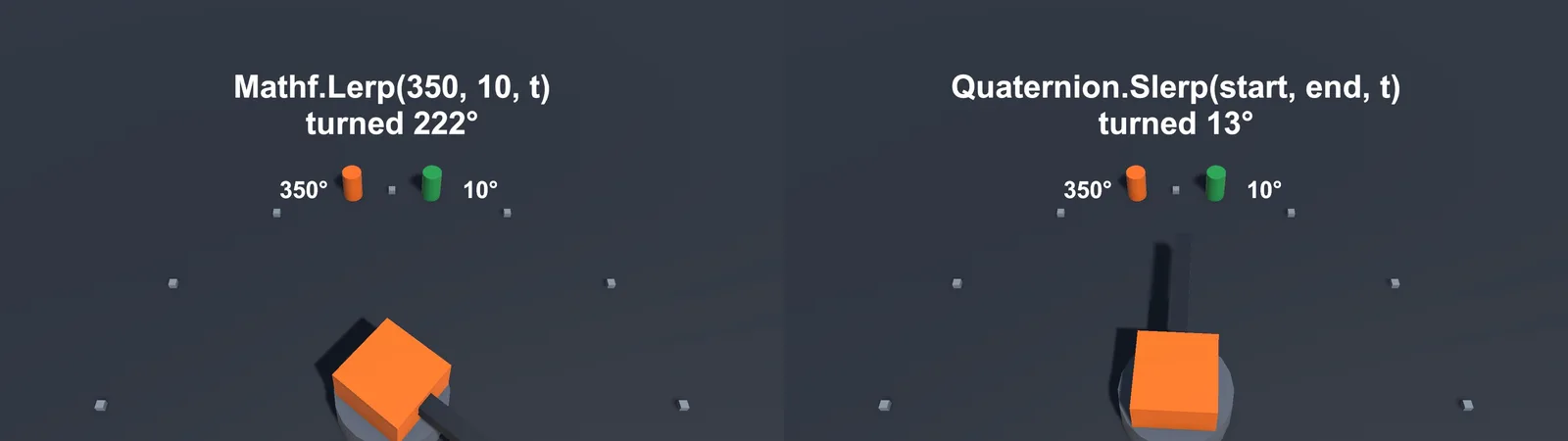
RotateTowards is better for gameplay (turrets with a max traverse speed, characters with a turn rate). Slerp feels nicer for cameras and UI. Both always take the short way around, unlike lerping Euler angles. Our Lerp explained guide covers why the exponential t matters.
Combining Rotations
Multiplying quaternions combines rotations, and order matters:
// Apply a local-space rotation (relative to current facing)
transform.rotation = transform.rotation * Quaternion.Euler(0f, 45f, 0f);

// Apply a world-space rotation
transform.rotation = Quaternion.Euler(0f, 45f, 0f) * transform.rotation;

// Rotate a vector by a quaternion
Vector3 rotatedOffset = Quaternion.Euler(0f, 90f, 0f) * Vector3.forward; // = Vector3.right
Rotating a vector is incredibly handy: spreading shotgun pellets, placing objects in a circle, or turning input into camera-relative movement (Quaternion.Euler(0, cam.eulerAngles.y, 0) * new Vector3(input.x, 0, input.y)).
Rotation in 2D
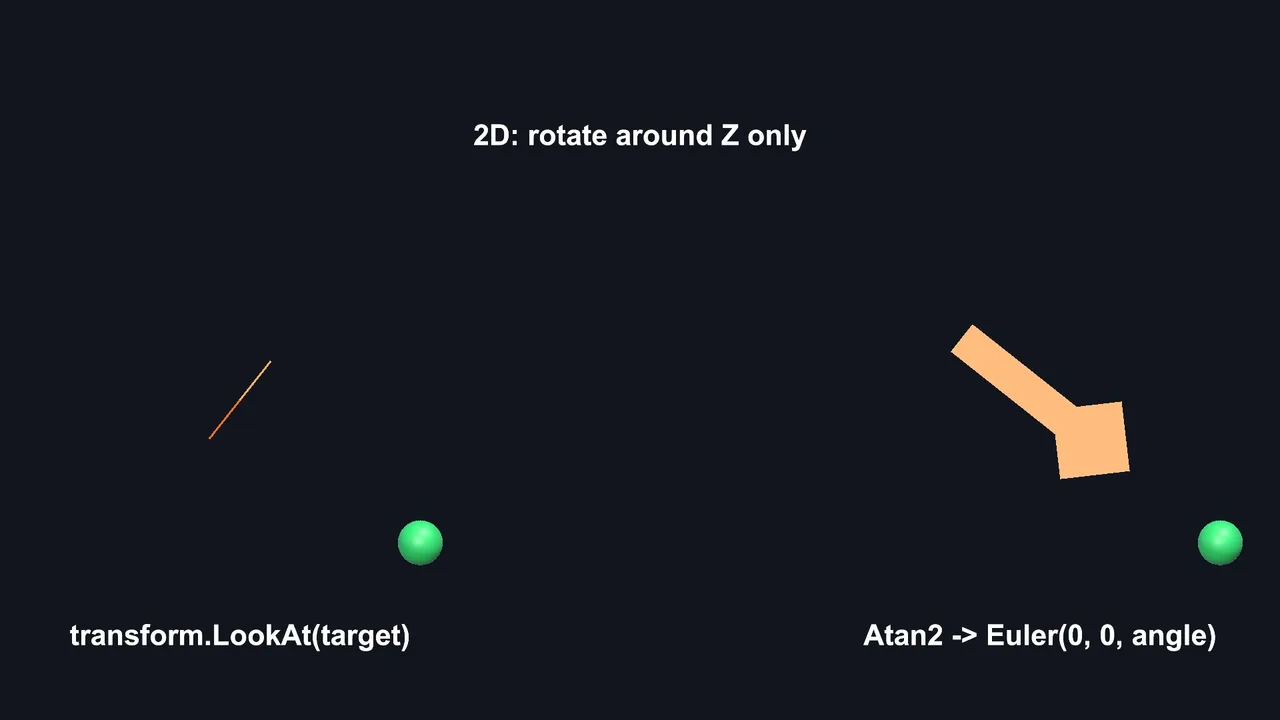
In 2D you only rotate around Z. Use Atan2 to get the angle of a direction:
Vector2 dir = (Vector2)(target.position - transform.position);
float angle = Mathf.Atan2(dir.y, dir.x) * Mathf.Rad2Deg;
transform.rotation = Quaternion.Euler(0f, 0f, angle);       // sprite art faces right
// transform.rotation = Quaternion.Euler(0f, 0f, angle - 90f); // sprite art faces up
Don’t use LookAt in 2D: it points the blue Z axis at the target and turns your sprite edge-on, making it invisible.
Mouse Look Without Gimbal Problems
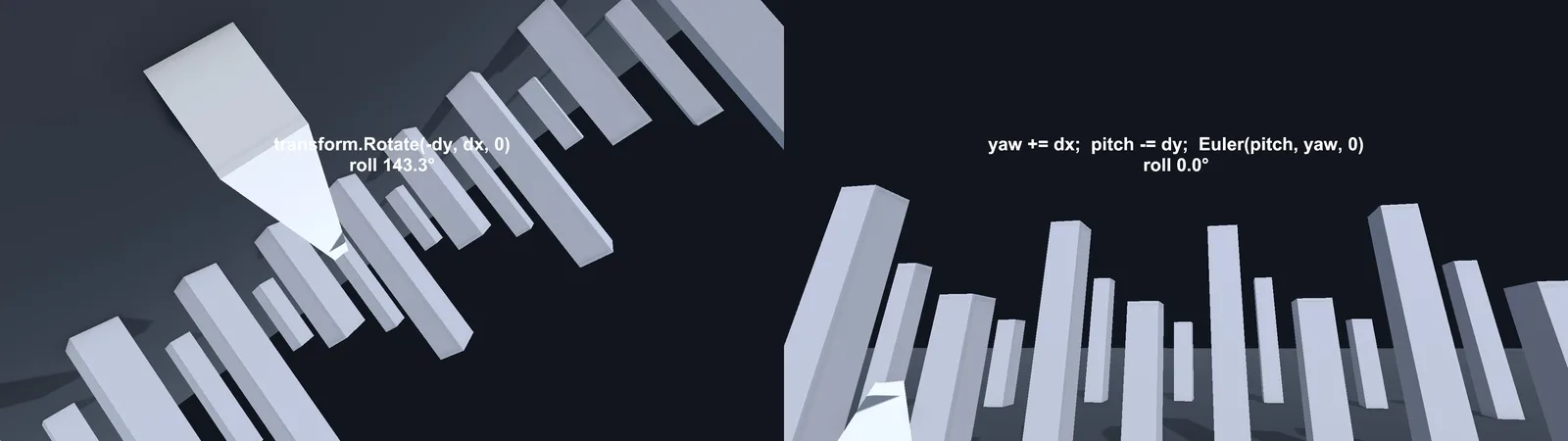
Store yaw and pitch as floats, clamp pitch, and rebuild the rotation every frame. Never accumulate small rotations with Rotate on both axes, which introduces roll over time:
float yaw, pitch;
[SerializeField] float sensitivity = 0.1f;
[SerializeField] Transform cameraPivot;

void Update()
{
    Vector2 look = Mouse.current.delta.ReadValue() * sensitivity;
    yaw += look.x;
    pitch = Mathf.Clamp(pitch - look.y, -85f, 85f);

    transform.rotation = Quaternion.Euler(0f, yaw, 0f);              // body turns left/right
    cameraPivot.localRotation = Quaternion.Euler(pitch, 0f, 0f);     // head looks up/down
}
Don’t multiply mouse delta by Time.deltaTime: mouse delta is already per-frame distance. For third-person cameras, Cinemachine handles all of this (see our Cinemachine 3 third-person camera guide).
📐 Maths finally clicking?
A good 3D maths book turns quaternions from scary to obvious. A couple of our favourites are in our game developer reading list.
Troubleshooting
Setting transform.rotation.x does nothing
transform.rotation returns a copy, and x is a quaternion component, not an angle. Use transform.rotation = Quaternion.Euler(x, y, z) instead.
Euler angles show weird values like 359.99 or -180
Euler angles are derived from the quaternion and wrap around. Keep your own angle variables rather than reading eulerAngles back.
Object rotates the long way around
You’re lerping Euler angles or vectors. Use Quaternion.Slerp, RotateTowards or Mathf.LerpAngle.
“Look rotation viewing vector is zero”
The direction passed to LookRotation has zero length, because the target is at the same position or the flattened direction is zero. Check sqrMagnitude first.
Model faces sideways or backwards after LookRotation
The model’s forward isn’t +Z. Fix it in the modelling tool, or parent the mesh to an empty object and rotate the child so its face points along the parent’s blue arrow.
FAQ
What is a quaternion in Unity?
A four-component number Unity uses to store rotations. It avoids gimbal lock and interpolates smoothly. You create them with Quaternion.Euler, AngleAxis or LookRotation rather than editing the components.
How do I convert a quaternion to Euler angles?
Use the eulerAngles property: Vector3 e = rotation.eulerAngles;. The result may not match the values you originally set, but represents the same orientation.
What’s the difference between rotation and localRotation?
rotation is in world space. localRotation is relative to the parent. For child objects such as a camera on a player, localRotation is usually what you want.
Slerp or RotateTowards?
RotateTowards for a fixed turn speed and exact arrival. Slerp with an exponential t for a smooth ease-out.
How do I rotate an object 90 degrees once?
Call transform.Rotate(0, 90, 0) once, or multiply: transform.rotation *= Quaternion.Euler(0, 90, 0).
Reader questions
Asked by readers of this article and answered by AI. Behavior can differ between Unity versions, so test in yours.



Leave a Reply