

Mesh colliders look like the easy answer to “make the collision match the model exactly”, and then the errors start: Rigidbodies that refuse to move, convex hulls that ignore your doorway, players falling straight through the floor. This guide explains the Unity mesh collider rules that cause almost every one of these problems, what convex and non-convex really mean to the physics engine, and when you should replace a mesh collider with a handful of primitives instead.
Convex vs Non-Convex in Plain English
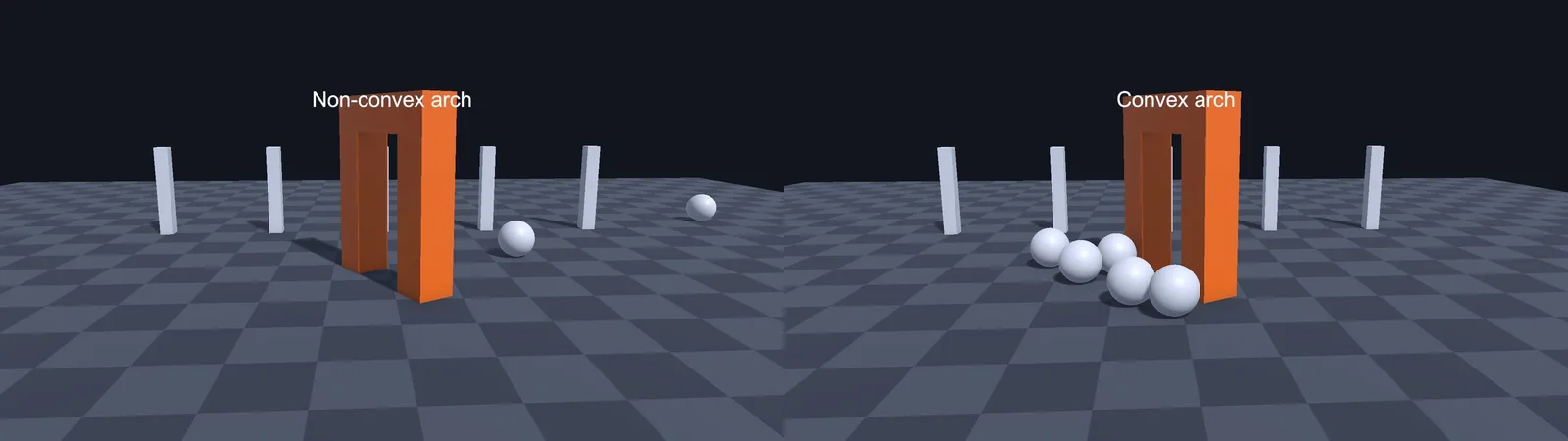
A shape is convex if a straight line between any two points inside it stays inside it. A ball, a box and a rock are convex. A cup, an archway, a letter C and a whole level are not: they have dents, holes or hollows.
Unity’s physics engine (PhysX) treats the two very differently:
- Convex Mesh Collider: PhysX wraps your mesh in a simplified convex hull, like shrink-wrapping it. Any dents and holes get filled in. In exchange it’s fast, solid, and works as a moving Rigidbody that can collide with anything.
- Non-convex (triangle) Mesh Collider: PhysX uses your actual triangles as a hollow surface. It matches the model exactly, but it has no inside, only a skin, and it can only be static or kinematic.
That last point explains most of this article. A triangle mesh is a set of infinitely thin surfaces. Two triangle meshes can’t reliably collide with each other, and anything that ends up “inside” one isn’t pushed out, because there is no inside.
The Non-Convex Rigidbody Error
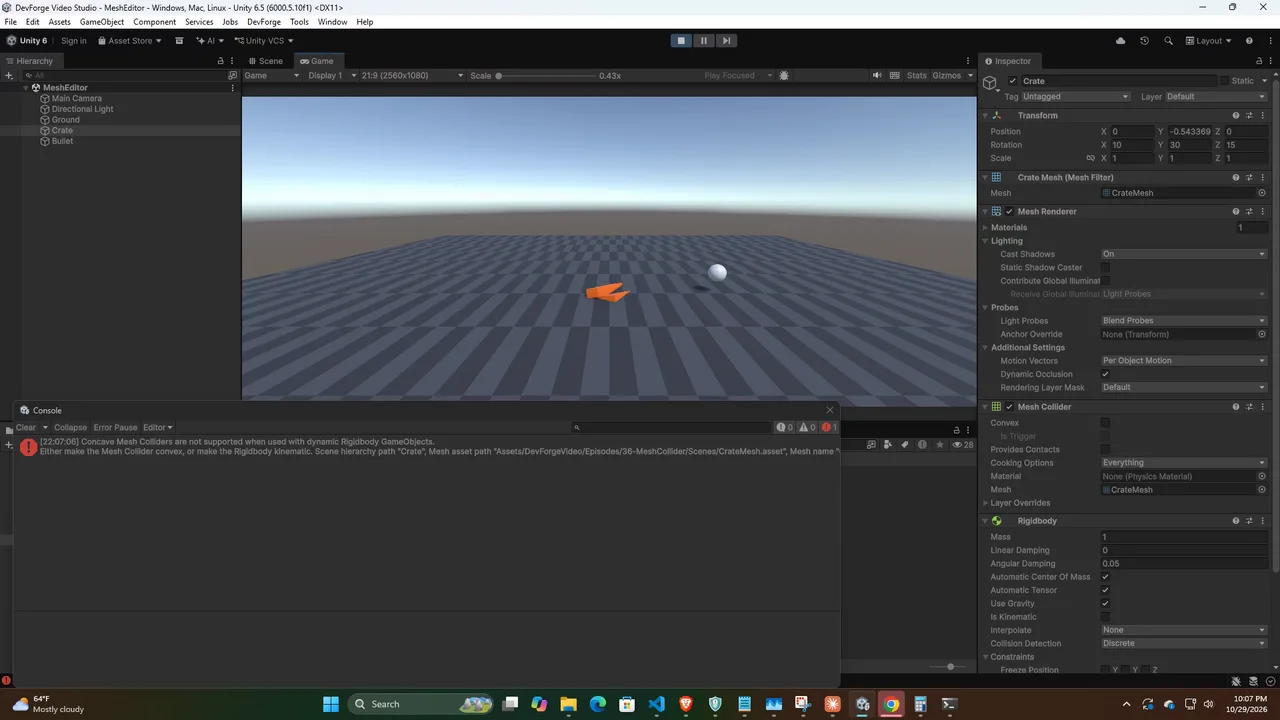
Add a Rigidbody to an object with a non-convex Mesh Collider and you get:
Concave Mesh Colliders are not supported when used with dynamic
Rigidbody GameObjects. Either make the Mesh Collider convex, or make the
Rigidbody kinematic.
(Older Unity versions word it as “Non-convex MeshCollider with non-kinematic Rigidbody is no longer supported since Unity 5”.)
Don’t expect the object to freeze. In our Unity 6.5 test the Rigidbody kept simulating, but PhysX ignored its mesh collider, so the object fell straight through the floor as if it had no collider at all. If something drops through the ground and the console shows this error, this is why. You have four options, in the order you should consider them:
- Tick Convex on the Mesh Collider. Fine for barrels, crates, rocks and most props.
- Replace it with primitives (a compound collider, below). Best for anything with important hollows, like a cart you can put items in.
- Make the Rigidbody kinematic if the object is moved by code or animation, not by physics: elevators, doors, rotating level pieces. Kinematic non-convex colliders can push dynamic objects. Move them with
Rigidbody.MovePositionandMoveRotationin FixedUpdate, as covered in our moving platforms guide. - Remove the Rigidbody if the object never moves. Static scenery like terrain pieces, buildings and level geometry should have no Rigidbody at all.
The same rule explains why two non-convex colliders never collide. Static meshes never test against each other anyway, and kinematic-versus-static pairs don’t generate contacts. At least one side of a collision needs to be a dynamic Rigidbody with a convex or primitive collider.
The 255 Triangle Convex Limit
Tick Convex on a detailed model and you may see a warning that Unity couldn’t create a convex mesh within the polygon limit. PhysX convex hulls are capped at 255 triangles. When your source mesh’s hull would need more, PhysX simplifies it, and the hull can come out lumpy or slightly smaller or bigger than the visual mesh.
The fix is not to fight the limit but to give the collider a simpler mesh:
- Model a low-poly collision mesh (often 20 to 100 triangles) alongside the render mesh in your 3D tool, export it in the same FBX, and assign it to the Mesh Collider’s Mesh field. Disable or delete its Mesh Renderer.
- Hide-and-ignore: a common convention is naming collision meshes with a
_colorUCX_suffix and stripping their renderer in an AssetPostprocessor editor script.
Even below the limit, remember the hull fills in holes. A convex doorway is a solid block. A convex bowl is a dome. If the gap matters to gameplay, convex is the wrong tool.
Objects Falling Through Mesh Colliders
This is the big one. The usual causes, from most to least common:
1. The object moves too fast (tunnelling)
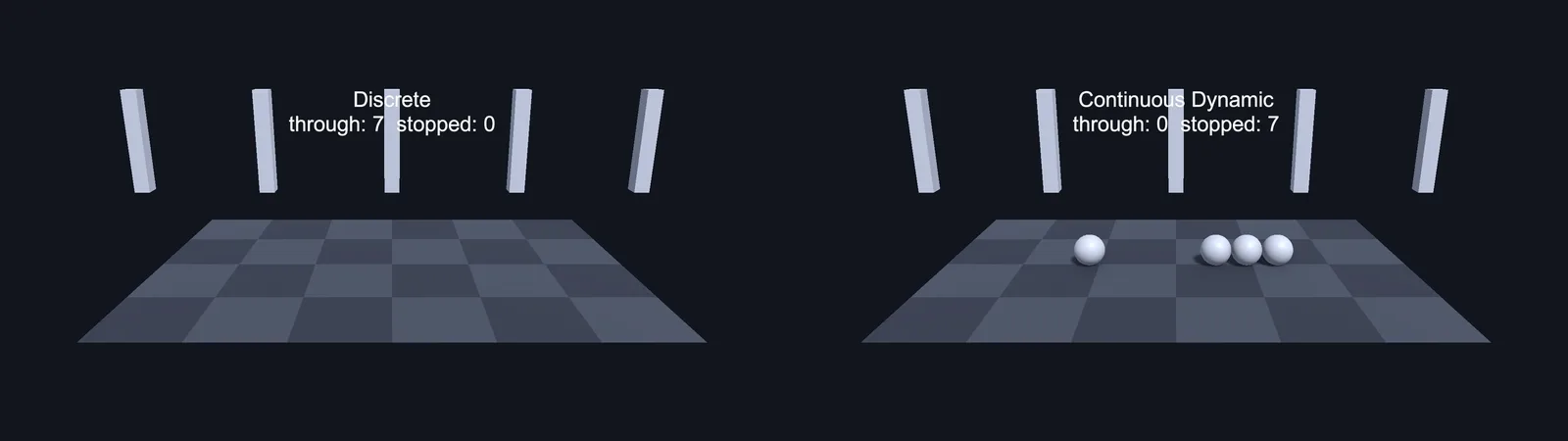
Physics checks positions once per FixedUpdate step. A bullet or a fast-falling player can be above a thin triangle surface on one step and below it the next, never touching it. Non-convex surfaces are especially vulnerable because they have zero thickness.
Fix: set the fast Rigidbody’s Collision Detection to Continuous Dynamic (or Continuous Speculative, which is cheaper and also handles rotation). For very fast projectiles, skip physics and use a raycast from last position to current position each step instead, as shown in our raycast tutorial.
2. Back-facing or missing triangles
Triangle mesh colliders are one-sided for some queries, notably raycasts, which don’t hit back faces by default. If the floor’s normals point down (common after mirroring a model with negative scale in a 3D app), raycast-based ground checks fail and a CharacterController can slip through. Recalculate or flip normals in your 3D tool. Gaps between separate floor meshes, even tiny ones, also let things through.
3. The object starts inside or gets pushed inside
Spawn a Rigidbody overlapping a triangle mesh and there’s no “inside” to resolve, so it may just fall through. Spawn slightly above the surface. The same happens when you teleport with transform.position into geometry. With a CharacterController, disable it before setting the position and re-enable it after, or the controller overwrites your teleport.
4. Moving the collider without a Rigidbody
Animating a static (no Rigidbody) mesh collider via its Transform is expensive and physically unreliable. Objects resting on it get no velocity from it and can sink through. Add a kinematic Rigidbody to anything that moves.
5. Scale problems
Extremely thin, extremely small or extremely large geometry hurts precision. Keep the world roughly at real-world scale (1 unit = 1 metre) and avoid paper-thin floors. A floor made of a single quad is worse than a floor with some thickness.
6. Wrong layer interactions
If two layers are unticked in the Layer Collision Matrix, nothing collides no matter how good the colliders are. See our guide to the collision layers matrix.
Compound Colliders: The Usual Best Answer
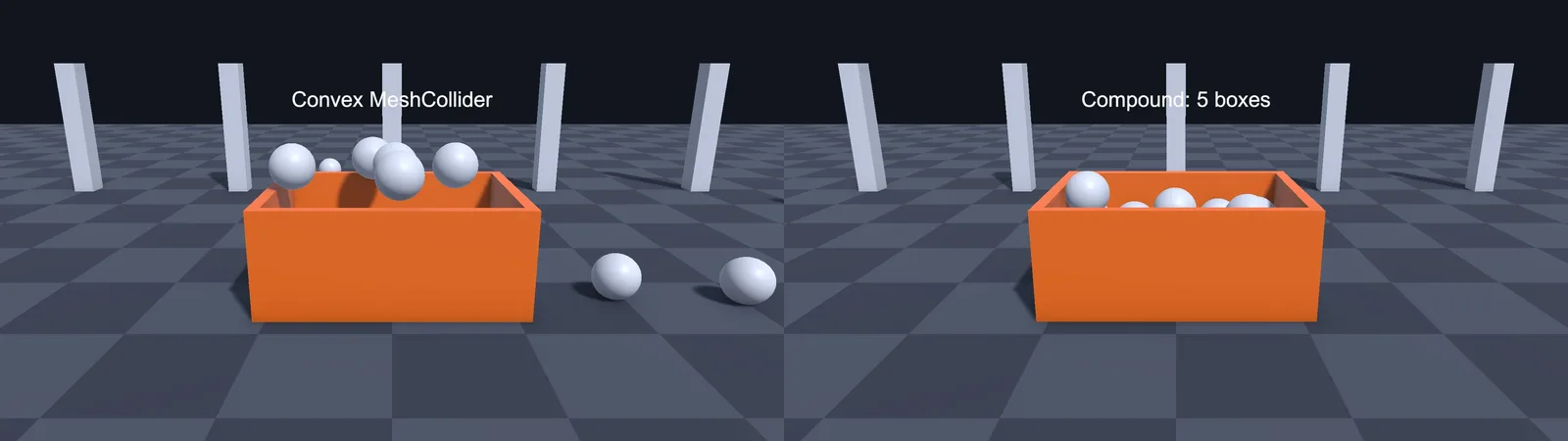
A compound collider is several primitive colliders (Box, Sphere, Capsule) on child objects of one Rigidbody. PhysX treats them as a single rigid body. They’re the go-to solution for dynamic objects with complex shapes:
- A chair: one box for the seat, one for the back, four thin boxes or capsules for legs.
- A cart with a hollow bed: a box floor and four thin boxes for walls, so items can sit inside.
- A character: a capsule for the body, plus sphere or capsule colliders on bones for hit detection.
Primitives are the fastest colliders PhysX has, they’re perfectly smooth (a capsule rolls properly, a convex hull of a cylinder bumps), and they have a solid inside so penetrations resolve cleanly. Put the Rigidbody on the parent only, and the colliders on children. Collision callbacks like OnCollisionEnter fire on the Rigidbody’s object.
using UnityEngine;

// Logs which child collider was hit on a compound Rigidbody.
public class CompoundHitLogger : MonoBehaviour
{
    void OnCollisionEnter(Collision collision)
    {
        // GetContact(0).thisCollider is the collider on THIS body that was touched.
        Collider part = collision.GetContact(0).thisCollider;
        Debug.Log($"{collision.gameObject.name} hit {part.name}");
    }
}
A good rule: static level geometry gets non-convex mesh colliders (or primitives for simple walls and floors), and anything with a dynamic Rigidbody gets primitives, compounds of primitives, or convex hulls of simple collision meshes.
🔧 Tired of hand-placing colliders?
Several Asset Store tools auto-generate convex decompositions and compound colliders from complex meshes. We cover the ones worth the money in our tools roundup.
Mesh Colliders at Runtime
Procedural meshes (generated terrain, destructible chunks, voxel worlds) need their collider updated when the mesh changes. Assigning sharedMesh triggers PhysX “cooking”, which converts the mesh into its collision format. Cooking a large mesh takes milliseconds and causes a hitch, so do it rarely and do it right:
using UnityEngine;

[RequireComponent(typeof(MeshFilter), typeof(MeshCollider))]
public class ProceduralColliderUpdater : MonoBehaviour
{
    MeshCollider meshCollider;

    void Awake() => meshCollider = GetComponent<MeshCollider>();

    public void ApplyMesh(Mesh mesh)
    {
        GetComponent<MeshFilter>().sharedMesh = mesh;
        meshCollider.sharedMesh = null;   // force a re-cook
        meshCollider.sharedMesh = mesh;
    }
}
Setting it to null first matters: if you modified the same Mesh object in place, assigning the identical reference may not re-cook. For heavy workloads, Physics.BakeMesh(mesh.GetInstanceID(), convex) can be called from a job or background thread ahead of time, then assigning the mesh on the main thread reuses the baked data.
Two more runtime gotchas. Imported meshes need Read/Write enabled in their import settings if you create or modify their mesh colliders at runtime in a build, otherwise you get errors or empty colliders on device. And the Mesh Collider’s Cooking Options dropdown can disable expensive welding and cleaning steps for meshes you’ve already cleaned yourself, cutting cook time.
Performance Tips
- Primitive colliders are cheapest, convex next, triangle meshes most expensive per query.
- Use simplified collision meshes for level geometry too. Your render mesh might have 50,000 triangles; collision rarely needs more than a few hundred.
- Avoid non-uniform scale on mesh colliders that move, since it forces extra work.
- Many small static mesh colliders are fine. Huge single mesh colliders spanning the entire level hurt broadphase culling, so split big levels into sections.
- Profile physics in the Profiler’s Physics module before optimizing blind.
Troubleshooting
“Concave Mesh Colliders are not supported” error (object falls through the floor)
Tick Convex, make the Rigidbody kinematic, remove the Rigidbody, or replace the mesh collider with primitives.
Convex collider doesn’t match the model
Convex hulls fill in every concave area and are capped at 255 triangles. Use a dedicated low-poly collision mesh or a compound of primitives.
Player falls through the floor at high speed
Tunnelling. Use Continuous collision detection on the fast Rigidbody, thicken the floor, or raycast ahead.
Raycasts pass through a mesh collider
The triangles face away from the ray (flipped normals), the layer is excluded by the layer mask, or the collider is a trigger and your query ignores triggers.
Two mesh colliders don’t collide at all
Neither is a dynamic Rigidbody, or both are non-convex. One side needs a dynamic Rigidbody with a convex or primitive collider.
Game hitches when a mesh collider updates
Cooking on the main thread. Use simpler collision meshes, adjust Cooking Options, or pre-bake with Physics.BakeMesh on a worker thread.
FAQ
Are mesh colliders bad for performance?
Not for static scenery with reasonable triangle counts. They become a problem when very detailed, constantly re-cooked, or used where primitives would do.
Can a non-convex mesh collider be a trigger?
No. Triggers on mesh colliders must be convex. Use a convex hull or primitive trigger volumes.
Why does my convex mesh collider look different from the mesh?
It’s the convex hull, limited to 255 triangles, so holes and dents are filled and fine detail is simplified.
Should my level use mesh colliders or box colliders?
Use boxes for simple floors and walls, and mesh colliders (ideally from simplified collision meshes) for organic or complex static geometry.
Does a CharacterController work with mesh colliders?
Yes. CharacterControllers collide fine with static non-convex mesh colliders, which is how most levels are built.
Reader questions
Asked by readers of this article and answered by AI. Behavior can differ between Unity versions, so test in yours.



Leave a Reply