
Moving platforms are a staple of 3D and 2D games, and a notorious source of bugs: the platform slides out from under the player, the player jitters while riding, falls through on the way down, or gets launched into space when the platform stops. This guide shows how to build Unity moving platforms that carry the player correctly: a kinematic Rigidbody platform moving between waypoints, then the right way to carry CharacterController and Rigidbody players, plus fixes for the classic problems.
Building the Platform
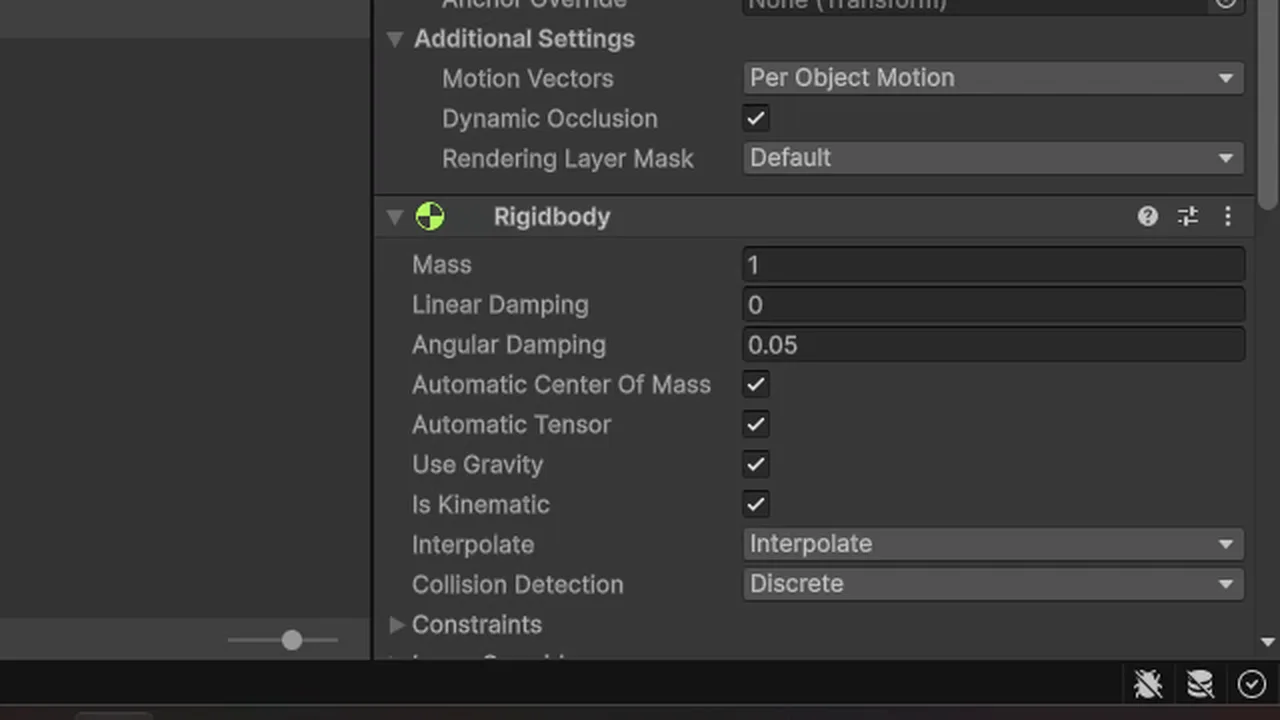
Create a cube scaled into a platform shape with a BoxCollider, and add a Rigidbody set to Is Kinematic with Interpolate on. A kinematic Rigidbody tells the physics engine “this object moves, but by script, not by forces”. That means:
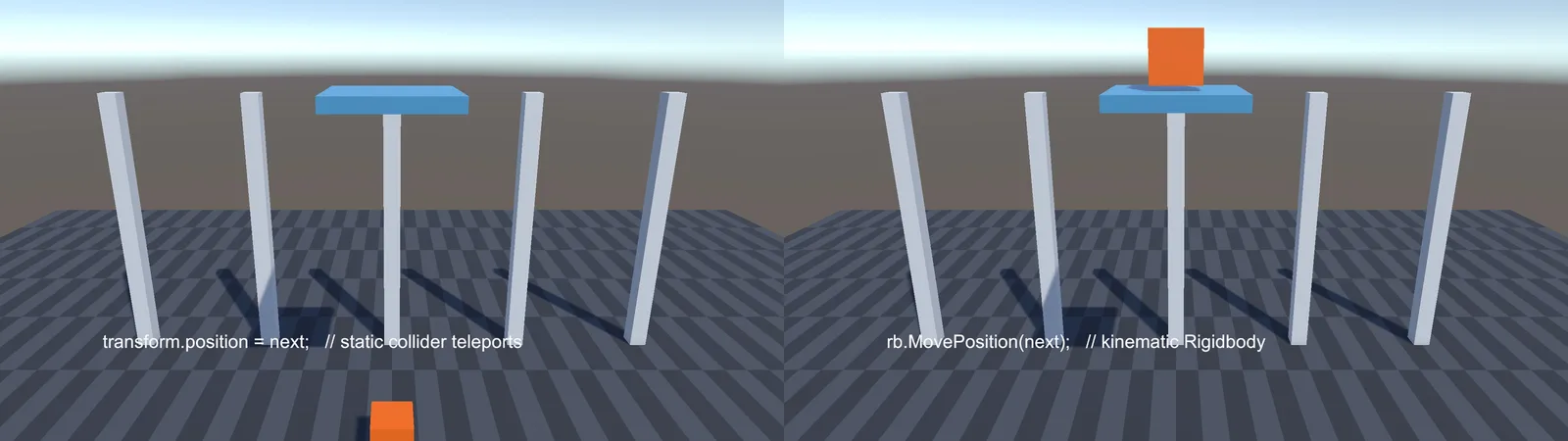
- Physics knows its velocity, so Rigidbodies resting on it are pushed correctly instead of the platform teleporting through them.
- Interpolation keeps it visually smooth between physics steps.
Moving a plain collider with transform.position works visually but physics treats it as teleporting. That’s the root of many jitter and fall-through problems.
Moving Between Waypoints
using UnityEngine;

[RequireComponent(typeof(Rigidbody))]
public class MovingPlatform : MonoBehaviour
{
    [SerializeField] Transform[] waypoints;
    [SerializeField] float speed = 2f;
    [SerializeField] float waitTime = 1f;

    public Vector3 Velocity { get; private set; }   // for riders
    public Vector3 Delta { get; private set; }      // movement this physics step

    Rigidbody rb;
    int index;
    float waitTimer;

    void Awake()
    {
        rb = GetComponent<Rigidbody>();
        rb.isKinematic = true;
        rb.interpolation = RigidbodyInterpolation.Interpolate;
    }

    void FixedUpdate()
    {
        Vector3 next = rb.position;

        if (waitTimer > 0f)
        {
            waitTimer -= Time.fixedDeltaTime;
        }
        else
        {
            Vector3 target = waypoints[index].position;
            next = Vector3.MoveTowards(rb.position, target, speed * Time.fixedDeltaTime);
            if ((next - target).sqrMagnitude < 0.0001f)
            {
                index = (index + 1) % waypoints.Length;
                waitTimer = waitTime;
            }
        }

        // MovePosition applies during the physics step, so record the intended movement
        Delta = next - rb.position;
        Velocity = Delta / Time.fixedDeltaTime;
        rb.MovePosition(next);
    }

    void OnDrawGizmos()
    {
        if (waypoints == null) return;
        Gizmos.color = Color.cyan;
        for (int i = 0; i < waypoints.Length; i++)
            if (waypoints[i] && waypoints[(i + 1) % waypoints.Length])
                Gizmos.DrawLine(waypoints[i].position, waypoints[(i + 1) % waypoints.Length].position);
    }
}
Make the waypoints empty GameObjects that are not children of the platform (otherwise they move with it). rb.MovePosition in FixedUpdate is the physics-friendly way to move a kinematic body.
The platform exposes Velocity and Delta so riders get its exact movement for each physics step.
Carrying a CharacterController Player
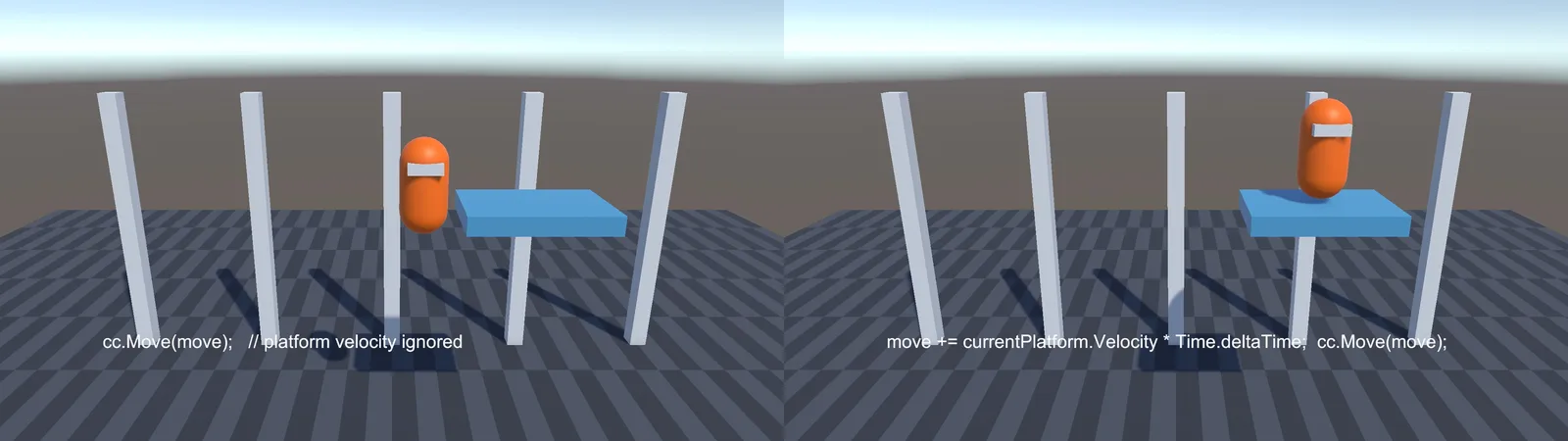
A CharacterController doesn’t respond to physics, so standing on a moving platform does nothing: the platform slides away underneath. The fix is to add the platform’s movement to the player’s own Move call:
// In the player's controller
CharacterController cc;
MovingPlatform currentPlatform;

void OnControllerColliderHit(ControllerColliderHit hit)
{
    // Only count platforms we're standing on, not ones we bump from the side
    if (hit.moveDirection.y < -0.5f && hit.collider.TryGetComponent(out MovingPlatform p))
        currentPlatform = p;
}

void Update()
{
    Vector3 move = (inputMove * speed + Vector3.up * verticalVelocity) * Time.deltaTime;

    if (currentPlatform != null)
        move += currentPlatform.Velocity * Time.deltaTime;

    cc.Move(move);

    if (!cc.isGrounded) currentPlatform = null;
}
Using the platform’s velocity times this frame’s deltaTime keeps the player in step whether the frame rate is above or below the physics rate. For rotating platforms, also rotate the player’s position around the platform’s pivot by the platform’s rotation delta. The two controller types are compared in our CharacterController vs Rigidbody guide.
When the player jumps off, add the platform’s velocity to their jump momentum, so jumping from a fast lift feels natural instead of the player stopping dead in mid-air.
Carrying a Rigidbody Player
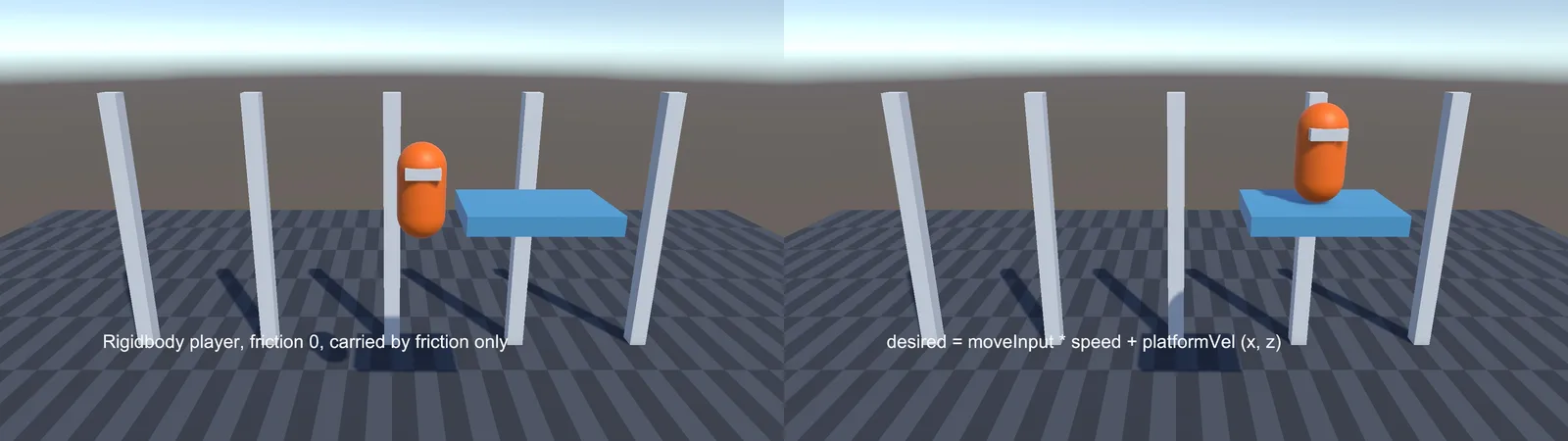
A Dynamic Rigidbody player standing on a kinematic platform is carried partly by friction, which often isn’t enough. The player slides, especially with a zero-friction physics material. Add the platform’s velocity to the player’s target velocity:
void FixedUpdate()
{
    Vector3 platformVel = groundPlatform ? groundPlatform.Velocity : Vector3.zero;
    Vector3 desired = moveInput * speed + new Vector3(platformVel.x, 0f, platformVel.z);
    rb.linearVelocity = new Vector3(desired.x, rb.linearVelocity.y, desired.z);
}
Detect groundPlatform from your ground check (a short raycast or sphere cast down, then TryGetComponent<MovingPlatform> on the hit). For vertical lifts, the kinematic body pushes the player up by itself. On the way down, a fast lift can drop away faster than gravity pulls the player, causing a bouncy ride. Snap the player down by also matching the platform’s downward velocity while grounded on it.
Why Not Just Parent the Player?
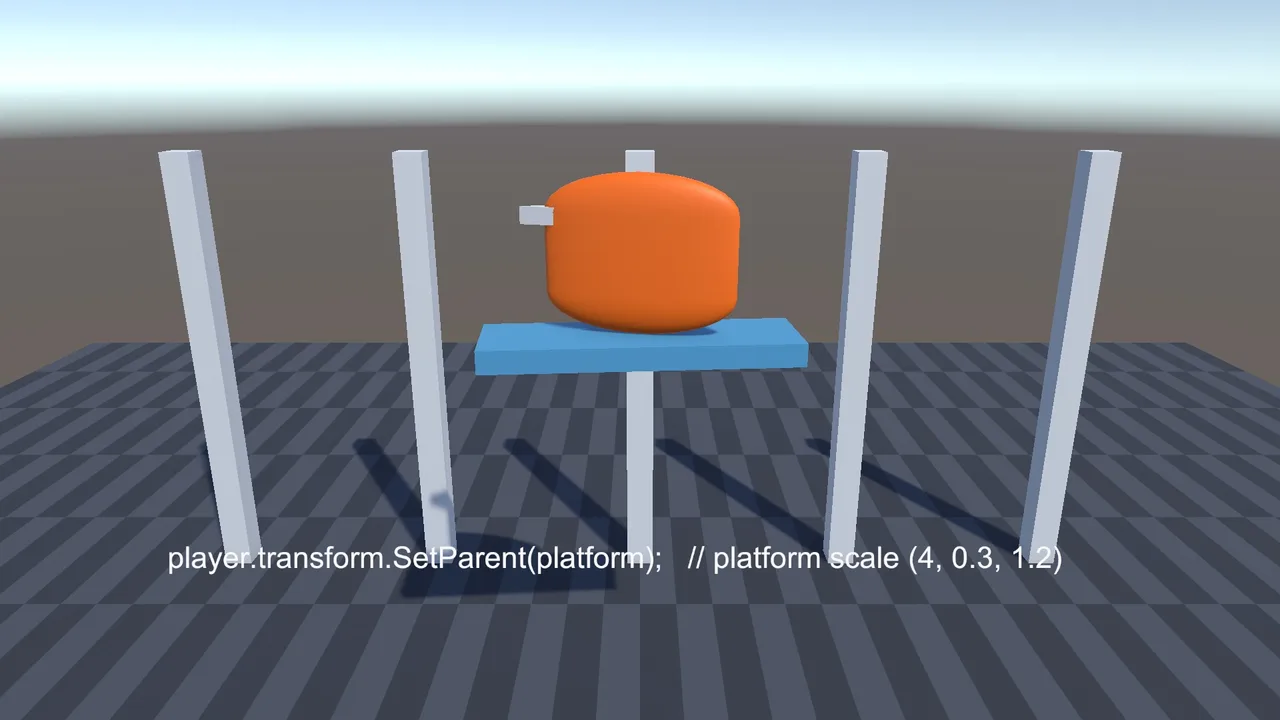
The classic trick is player.transform.SetParent(platform) on enter and SetParent(null) on exit. It can work for simple cases, but it’s fragile:
- A scaled platform scales and skews the player.
- Rigidbodies and CharacterControllers fight the parent transform, causing jitter.
- Parenting during physics callbacks can throw errors, and the player can stay attached after leaving (for example when respawning).
- Parenting under objects that get destroyed destroys the player too.
The velocity approach above avoids all of these, which is why most character controller assets use it.
🏃 Want a controller that handles platforms for you?
Several Asset Store character controllers handle moving and rotating platforms, slopes and steps out of the box. We list the ones indie devs rely on.
Moving Platforms in 2D
The same ideas apply with 2D physics: a Rigidbody2D set to Kinematic, moved with rb.MovePosition in FixedUpdate, and riders adding the platform’s velocity to their own. For one-way platforms you can jump up through, add a PlatformEffector2D to the platform with Use One Way ticked, and tick Used By Effector on its collider.
One-Way, Falling and Triggered Platforms
- Triggered platforms: start moving when the player steps on. Add a trigger collider on top and enable the mover in OnTriggerEnter. If the trigger never fires, see OnTriggerEnter not working.
- Falling platforms: wait a moment after the player lands, shake, then switch the Rigidbody to non-kinematic so it drops, and reset it after a few seconds.
- Elevators: same mover with two waypoints, and a button that sets the target index instead of looping.
Troubleshooting
The platform slides out from under the player
The player isn’t receiving the platform’s movement. Add the platform’s velocity to the player’s movement, as above.
The player jitters while riding
The platform moves in Update or via transform while the player moves in physics, or interpolation is off. Move the platform with MovePosition in FixedUpdate, turn on Interpolate for both, and move the camera in LateUpdate (see Rigidbody jitter fix).
The player falls through a platform moving up or down
The platform is moved by transform (teleporting), or it’s thin and fast. Use a kinematic Rigidbody with MovePosition, give it a thicker collider, and use Continuous collision detection on the player.
The player is launched when the platform stops
The player kept the platform’s velocity after the platform stopped, or the velocity was calculated from a teleport. Recompute the velocity every physics step, and clear the platform reference once the player leaves it.
The player gets scaled or skewed
The player is parented to a non-uniformly scaled platform. Use the velocity approach, or parent to an unscaled child object instead.
FAQ
How do I make a moving platform in Unity?
Give the platform a kinematic Rigidbody with interpolation and move it with Rigidbody.MovePosition in FixedUpdate, between waypoint Transforms.
How do I keep the player on a moving platform?
Add the platform’s velocity to the player’s movement each frame. Parenting works only for simple setups.
Should a moving platform be kinematic?
Yes. A kinematic Rigidbody moves by script but reports its velocity to physics, so riders and collisions behave correctly.
Why does my CharacterController slide off moving platforms?
CharacterControllers ignore physics pushes. You must add the platform’s movement to the controller’s Move call yourself.
How do I make a one-way platform in 2D?
Add a PlatformEffector2D with Use One Way enabled, and tick Used By Effector on the platform’s collider.
Reader questions
Asked by readers of this article and answered by AI. Behavior can differ between Unity versions, so test in yours.



Leave a Reply