

You add a collider, tick Is Trigger, write OnTriggerEnter, walk your player into it… and nothing happens. No log, no error. Trigger problems are frustrating because Unity fails silently, but there are only a handful of reasons a trigger won’t fire, and you can check all of them in a few minutes. This checklist covers 3D and 2D triggers in Unity 6, plus the related “OnCollisionEnter not working” and “OnMouseDown not working” problems, and includes a script that checks your setup for you.
Quick answer
OnTriggerEnter only fires when one of the two colliders has Is Trigger ticked, at least one object has a Rigidbody (kinematic is fine) or a CharacterController, and the method is spelled exactly void OnTriggerEnter(Collider other) on a script attached to one of those objects. In 2D, every piece must be 2D: Collider2D, Rigidbody2D and OnTriggerEnter2D(Collider2D other). In 3D, two kinematic Rigidbodies do get trigger events, so if that case fails, check the layer collision matrix and the rest of the 12-point checklist.
The Rules Unity Triggers Follow
A trigger event needs three things:
- Two colliders that overlap, and at least one of them has Is Trigger ticked.
- At least one of the two objects has a Rigidbody (a kinematic Rigidbody counts), or is moved by a CharacterController.
- A script with a correctly spelled message method on the right GameObject.
Whether you get events depends on what each object has:
| Moving object | Trigger object | OnTriggerEnter fires? |
|---|---|---|
| Collider only (no Rigidbody) | Trigger collider only (no Rigidbody) | No. Neither has a Rigidbody. |
| Collider + Rigidbody (dynamic) | Trigger collider only | Yes |
| Collider + Rigidbody (kinematic) | Trigger collider only | Yes |
| CharacterController | Trigger collider only | Yes |
| Collider only | Trigger collider + kinematic Rigidbody | Yes |
The first row is the cause of most “trigger not working” posts: a player moved by transform.position or Translate with no Rigidbody, walking into a trigger that has no Rigidbody either.
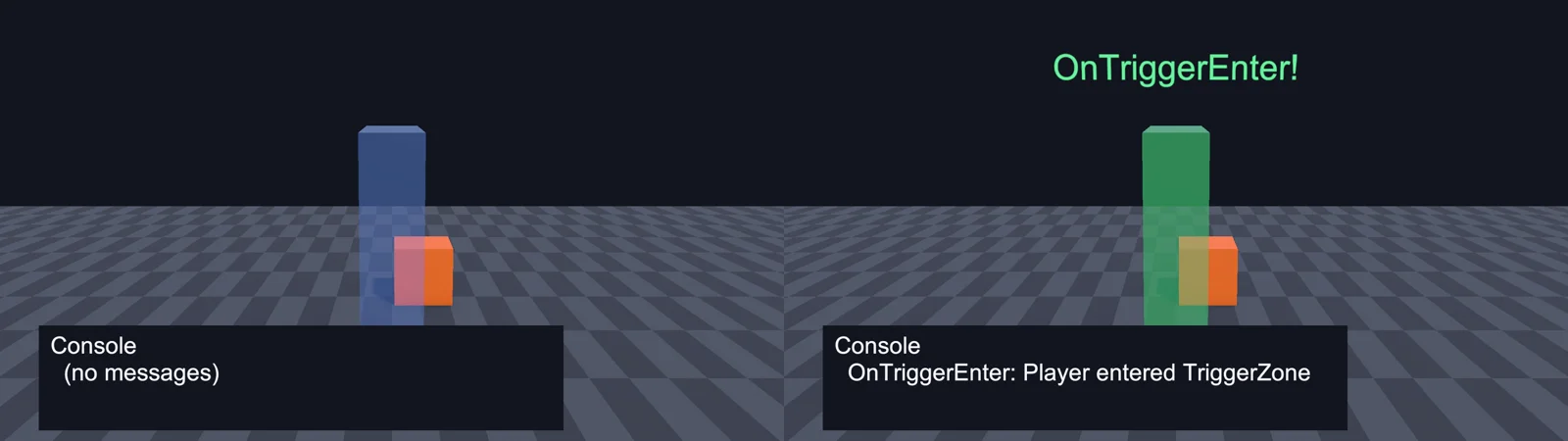
The 12-Point Checklist
Work through these in order. The first four fix the large majority of cases.
1. At least one object has a Rigidbody
Add a Rigidbody to the moving object (usually the player or the projectile). If you move it from code and don’t want gravity or physics pushing it around, tick Is Kinematic. A kinematic Rigidbody still generates trigger events. If the object uses a CharacterController, it already works with triggers and doesn’t need a Rigidbody.
If you move a Rigidbody from code, use Rigidbody.MovePosition in FixedUpdate instead of setting transform.position. Physics then knows the object moved, rather than seeing it teleport.
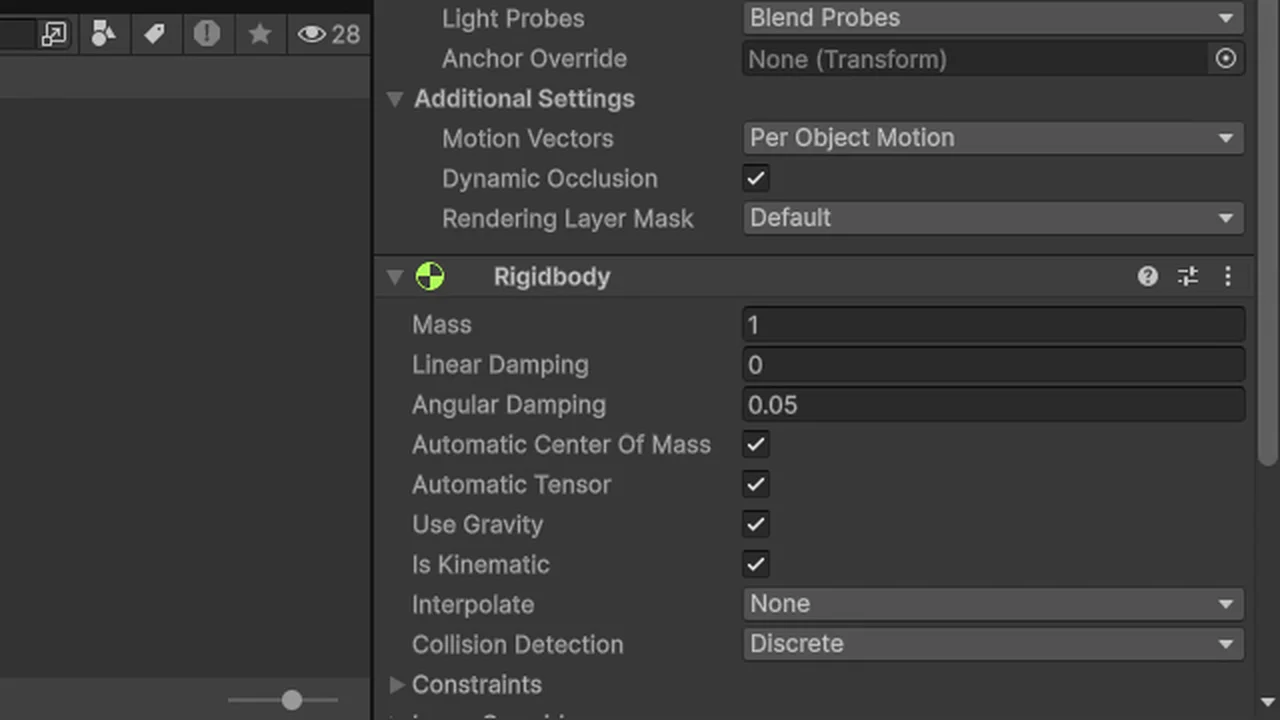
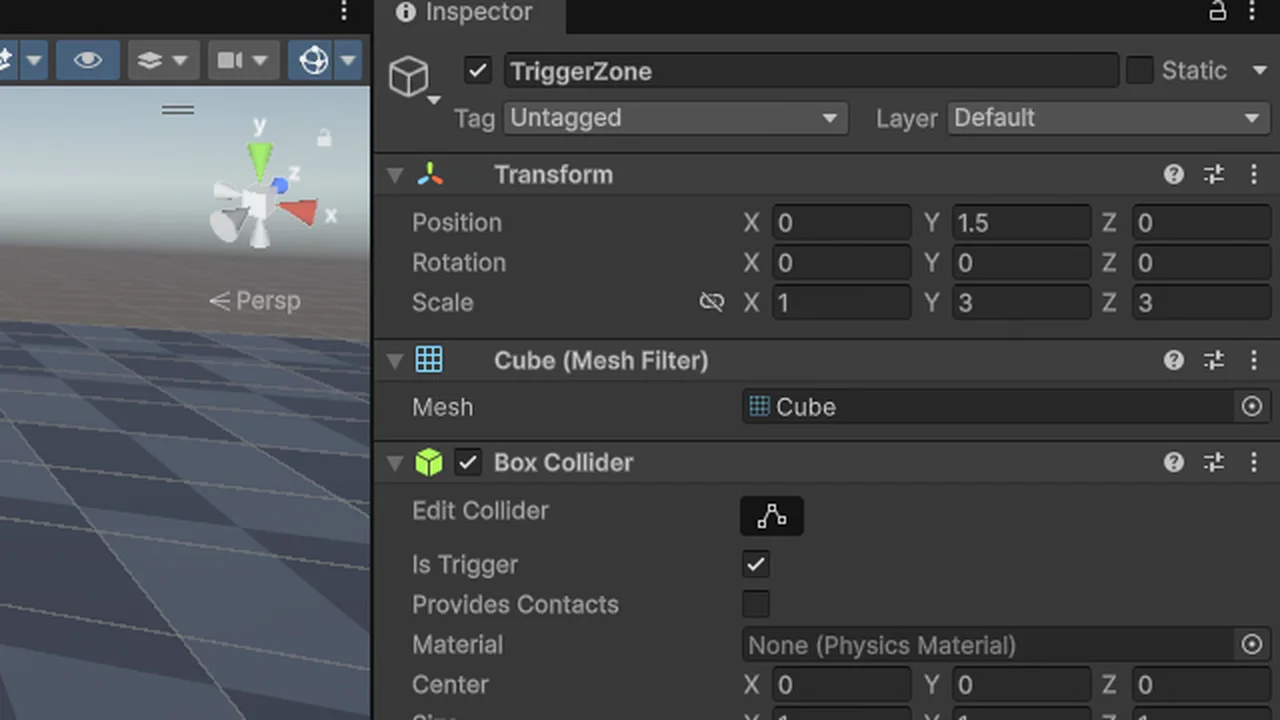
2. Is Trigger is ticked on one of the colliders
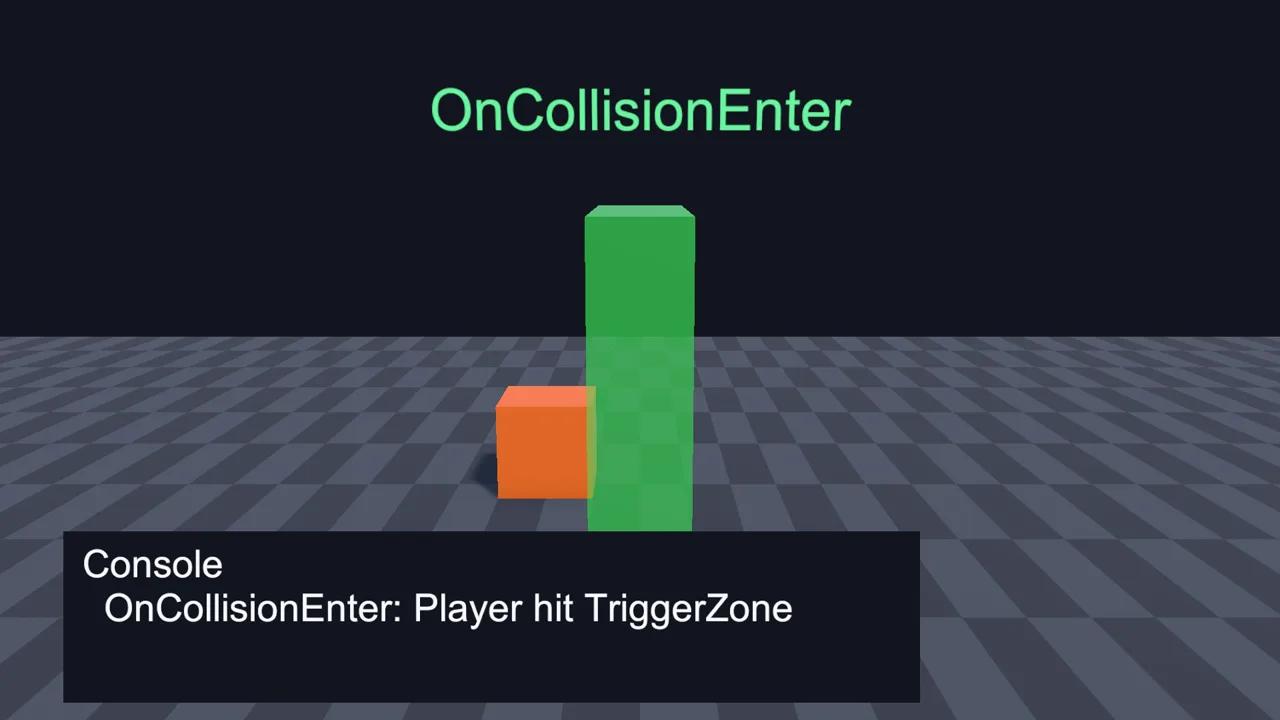
If neither collider is a trigger, the objects collide physically and Unity calls OnCollisionEnter, not OnTriggerEnter. If the objects bump into each other instead of passing through, this is your problem. Tick Is Trigger on the zone, pickup or checkpoint collider.
3. The method signature is exactly right
Unity finds message methods by name and parameter type. A typo means Unity never calls it, and there’s no compiler error because it’s a perfectly valid method name:
// Correct (3D)
void OnTriggerEnter(Collider other) { }
void OnTriggerStay(Collider other) { }
void OnTriggerExit(Collider other) { }

// Wrong: never called
void OnTriggerEnter(Collision other) { }   // wrong parameter type (Unity logs a script error)
void onTriggerEnter(Collider other) { }    // lowercase o
void OnTriggerEntered(Collider other) { }  // wrong name
void OnTriggerEnter2D(Collider other) { }  // 2D name with a 3D parameter
With the wrong parameter type, Unity prints a Console message like “Script error: OnTriggerEnter. This message parameter has to be of type: Collider.” Your code editor helps too: with IntelliSense working, typing OnTrig should autocomplete the correct signature. If it doesn’t, see our IntelliSense fix guide.
4. You’re not mixing 2D and 3D physics
Unity has two completely separate physics engines. A BoxCollider never detects a BoxCollider2D, and a Rigidbody2D does nothing for a 3D collider. For sprites and tilemaps, use the 2D components (Rigidbody2D, BoxCollider2D, CircleCollider2D) and OnTriggerEnter2D(Collider2D other). It’s easy to get wrong because both sets appear in the Add Component menu. See the 2D section.
5. The script is on the right GameObject
Trigger messages go to the GameObject that owns the collider involved, and to the GameObject that owns the Rigidbody. If your collider is on a child object and your script is on a sibling or an unrelated object, it won’t hear anything. Put the script on the trigger’s GameObject, or on the Rigidbody’s GameObject.
Also remember that other is the collider that entered, which may be on a child of your player (a weapon, a foot collider). If you check other.CompareTag("Player") and the tag is only on the root, the check fails. Use the Rigidbody’s GameObject instead:
void OnTriggerEnter(Collider other)
{
    // Works even if the collider that entered is on a child of the player
    GameObject root = other.attachedRigidbody != null
        ? other.attachedRigidbody.gameObject
        : other.gameObject;

    if (root.CompareTag("Player"))
    {
        Debug.Log("Player entered " + name);
    }
}
6. Your if-statement isn’t hiding it
Put a log on the very first line of the method, before any if:
void OnTriggerEnter(Collider other)
{
    Debug.Log($"{name} trigger entered by {other.name} (tag: {other.tag}, layer: {LayerMask.LayerToName(other.gameObject.layer)})", this);
    // ...your checks
}
If this logs, the trigger works and your condition is wrong: a misspelled tag (tags are case-sensitive), a comparison against other.name that includes “(Clone)” on spawned objects, or a layer check with the wrong mask. Prefer CompareTag over other.tag == "Player"; it’s faster and logs an error if the tag doesn’t exist.
7. The Layer Collision Matrix allows it
Open Edit > Project Settings > Physics and find the Layer Collision Matrix. If the checkbox where the two objects’ layers meet is unticked, those layers ignore each other completely, triggers included. 2D physics has its own matrix under Physics 2D. Also check the Layer Overrides (Include/Exclude Layers) section on the collider and Rigidbody components, which can exclude layers per object.
8. Mesh Colliders are convex
A non-convex Mesh Collider can’t be a trigger. Tick Convex on the Mesh Collider, or use a Box, Sphere or Capsule Collider instead. Primitive colliders are cheaper anyway, and for most trigger zones a box is exactly the right shape.
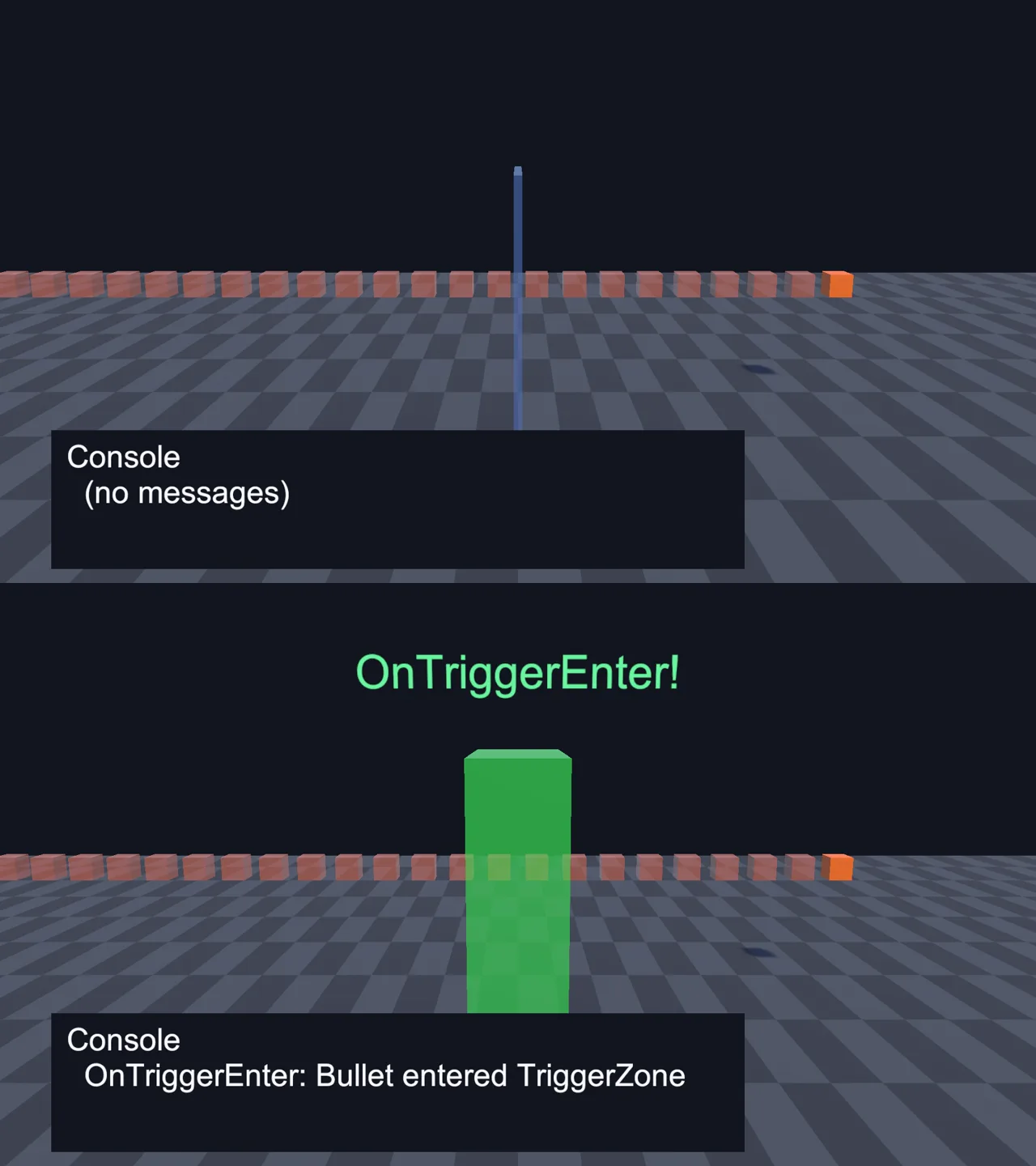
9. The object isn’t moving too fast
Physics runs in fixed steps (50 per second by default). A bullet moving 100 metres per second travels 2 metres per step, so it can be on one side of a thin trigger in one step and past it in the next. This is called tunnelling. Fixes:
- Make the trigger thicker in the direction of travel.
- For fast projectiles, don’t rely on triggers: cast a ray or sphere from last frame’s position to this frame’s position with
Physics.RaycastorPhysics.SphereCastand handle the hit yourself. - Teleporting an object with
transform.positioncan skip over a trigger entirely. Move it withRigidbody.MovePosition.
10. Physics is actually running
If Time.timeScale is 0 (a pause menu that never unpaused), no physics runs and no triggers fire. Also check Project Settings > Physics > Simulation Mode: if it’s set to Script, physics only steps when your code calls Physics.Simulate.
11. Both GameObjects and colliders are enabled
An inactive GameObject or a disabled Collider component takes part in no physics. Note the asymmetry with scripts: a disabled script (unticked MonoBehaviour) still receives trigger and collision messages, so disabling the component is not a way to stop them. Use a bool flag or disable the collider instead.
Related gotcha: if an object is deactivated or destroyed while inside a trigger, OnTriggerExit is not called for it. Code that counts “things inside the zone” should also handle OnDisable/OnDestroy on the objects, or clean up null entries.
12. The trigger’s own Rigidbody isn’t sleeping or misconfigured
If you put a non-kinematic Rigidbody on a trigger zone, it falls through the floor due to gravity (it’s a trigger, so nothing holds it up) and your “trigger” ends up far below the level. Use Is Kinematic for Rigidbodies on static trigger zones, or leave the zone without a Rigidbody and put one on the mover instead.
🛠 Half of these bugs are spelling
Message methods like OnTriggerEnter, tags and layer names all fail silently when they’re misspelled. A consistent naming standard for scripts, tags and layers catches most of them before they happen.
2D Triggers: OnTriggerEnter2D Not Working
Everything above applies to 2D, with these differences:
- Use the 2D method and parameter:
void OnTriggerEnter2D(Collider2D other). - Use 2D components only:
Rigidbody2Dplus aCollider2D(BoxCollider2D,CircleCollider2D,CapsuleCollider2D,PolygonCollider2D,CompositeCollider2D). - Body Type matters. Two objects with Static Rigidbody2Ds (or no Rigidbody2D at all) never interact. Give the mover a Dynamic or Kinematic Rigidbody2D. Kinematic bodies normally only register collisions with Dynamic bodies, but triggers are an exception, so a kinematic mover does fire trigger events against a static trigger.
- Simulated must be ticked on the Rigidbody2D. Unticking it removes the body from 2D physics entirely.
- Z position doesn’t matter. 2D physics ignores Z, so a trigger at Z = 5 still overlaps a player at Z = 0. That also means sorting-layer order has no effect on triggers.
- Tilemap triggers: add a Tilemap Collider 2D (optionally with a Composite Collider 2D) and tick Is Trigger on the one that’s used. When a Composite Collider is used, the trigger setting on the composite is the one that counts.
using UnityEngine;

public class Coin : MonoBehaviour
{
    [SerializeField] int value = 1;

    void OnTriggerEnter2D(Collider2D other)
    {
        if (!other.CompareTag("Player")) return;

        ScoreManager.Instance.Add(value);
        Destroy(gameObject);
    }
}
OnCollisionEnter Not Working
Collision events have a stricter rule than triggers: at least one object needs a non-kinematic (dynamic) Rigidbody, and neither collider can be a trigger.
- Kinematic vs static, or kinematic vs kinematic: no
OnCollisionEnterin 3D. Make one of them dynamic, or switch to triggers. - The signature is
void OnCollisionEnter(Collision collision), with aCollision, not aCollider. Get the other object withcollision.gameObjectand the contact point withcollision.GetContact(0).point. - CharacterController doesn’t produce
OnCollisionEnterfor the objects it walks into. UseOnControllerColliderHit(ControllerColliderHit hit)on the character’s script instead. - In 2D, the method is
OnCollisionEnter2D(Collision2D collision). Kinematic Rigidbody2Ds only get collision callbacks against Dynamic bodies unless you enable full kinematic contacts on the Rigidbody2D. - Fast objects can pass through each other. Set the fast Rigidbody’s Collision Detection to Continuous (or Continuous Dynamic if both objects move fast).
OnMouseDown Not Working
OnMouseDown is a related “why isn’t my method called” problem. Check these:
- The object needs a collider (3D or 2D). No collider, no mouse events. The script must be on the same GameObject as the collider.
- It’s not on the Ignore Raycast layer. Unity skips objects on that layer.
- Trigger colliders only receive mouse events if Queries Hit Triggers is enabled in the Physics (or Physics 2D) settings.
- The new Input System. This is the big one in Unity 6. If Project Settings > Player > Active Input Handling is set to Input System Package (New), the
OnMouseDown/OnMouseEnter/OnMouseDragfamily is never called. Either set it to Both, or use the event system approach below. - Something in front blocks the ray, such as a large invisible trigger volume. Note that UI does not block
OnMouseDown: clicks on a button also reach 3D objects behind it.
The Input System-friendly replacement uses the EventSystem, which also respects UI blocking:
using UnityEngine;
using UnityEngine.EventSystems;

// Requirements:
// 1. The camera has a Physics Raycaster (or Physics 2D Raycaster) component.
// 2. The scene has an EventSystem (GameObject > UI > Event System).
// 3. This object has a collider.
public class ClickableCrate : MonoBehaviour, IPointerClickHandler
{
    public void OnPointerClick(PointerEventData eventData)
    {
        Debug.Log($"Clicked {name} with {eventData.button}");
    }
}
More on the new input stack in our Unity Input System guide.
A Script That Checks Your Trigger Setup
Add this component to the trigger object (or the mover) and press Play. It logs every problem from the checklist that it can detect, then logs each trigger event it receives. Remove it once things work.
using UnityEngine;

public class TriggerSetupCheck : MonoBehaviour
{
    void Start()
    {
        Collider[] cols3D = GetComponentsInChildren<Collider>();
        Collider2D[] cols2D = GetComponentsInChildren<Collider2D>();

        if (cols3D.Length == 0 && cols2D.Length == 0)
            Debug.LogWarning($"{name}: no colliders on this object or its children.", this);

        if (cols3D.Length > 0 && cols2D.Length > 0)
            Debug.LogWarning($"{name}: has BOTH 3D and 2D colliders. 3D and 2D physics never interact.", this);

        foreach (Collider c in cols3D)
        {
            if (!c.enabled) Debug.LogWarning($"{c.name}: collider is disabled.", c);
            if (c is MeshCollider mc && mc.isTrigger && !mc.convex)
                Debug.LogWarning($"{c.name}: non-convex MeshCollider can't be a trigger. Tick Convex.", c);
            Debug.Log($"{c.name}: {c.GetType().Name}, isTrigger={c.isTrigger}, rigidbody={(c.attachedRigidbody ? c.attachedRigidbody.name + (c.attachedRigidbody.isKinematic ? " (kinematic)" : " (dynamic)") : "none")}", c);
        }

        foreach (Collider2D c in cols2D)
        {
            if (!c.enabled) Debug.LogWarning($"{c.name}: collider is disabled.", c);
            Rigidbody2D rb = c.attachedRigidbody;
            if (rb != null && !rb.simulated) Debug.LogWarning($"{c.name}: Rigidbody2D has Simulated turned off.", c);
            Debug.Log($"{c.name}: {c.GetType().Name}, isTrigger={c.isTrigger}, rigidbody2D={(rb ? rb.name + " (" + rb.bodyType + ")" : "none")}", c);
        }

        if (Time.timeScale == 0f) Debug.LogWarning("Time.timeScale is 0, so physics is paused.");
    }

    void OnTriggerEnter(Collider other) => Debug.Log($"[3D] {name} OnTriggerEnter with {other.name}", this);
    void OnTriggerExit(Collider other) => Debug.Log($"[3D] {name} OnTriggerExit with {other.name}", this);
    void OnTriggerEnter2D(Collider2D other) => Debug.Log($"[2D] {name} OnTriggerEnter2D with {other.name}", this);
    void OnTriggerExit2D(Collider2D other) => Debug.Log($"[2D] {name} OnTriggerExit2D with {other.name}", this);
    void OnCollisionEnter(Collision c) => Debug.Log($"[3D] {name} OnCollisionEnter with {c.gameObject.name}", this);
    void OnCollisionEnter2D(Collision2D c) => Debug.Log($"[2D] {name} OnCollisionEnter2D with {c.gameObject.name}", this);
}
Read the output like this: if both objects report rigidbody=none, you’ve found point 1. If you see OnCollisionEnter logs but no trigger logs, Is Trigger is off. If nothing logs at all and the setup looks right, check the Layer Collision Matrix.
You can also see colliders while playing: enable Gizmos in the Game view toolbar, or open Window > Analysis > Physics Debugger to visualize every collider and its type in the Scene view.
FAQ
Why is OnTriggerEnter not being called?
The most common reason is that neither object has a Rigidbody. Add one to the moving object (tick Is Kinematic if you move it from code), make sure one collider has Is Trigger ticked, and check the method is spelled OnTriggerEnter(Collider other).
Does a trigger need a Rigidbody in Unity?
At least one of the two objects involved needs a Rigidbody (kinematic is fine) or a CharacterController. It doesn’t have to be the trigger itself. Usually it’s easiest to put it on the moving object.
Why does OnTriggerEnter fire twice?
The entering object has two colliders (for example a capsule plus a child hitbox), and each one generates its own event. Filter by other.attachedRigidbody, keep a set of objects already handled, or put the extra collider on a layer that doesn’t interact with the trigger.
What’s the difference between OnTriggerEnter and OnCollisionEnter?
Triggers detect overlap without any physical response; objects pass through. Collisions happen when neither collider is a trigger and at least one object has a dynamic Rigidbody; the objects bounce or stop and you get contact points.
Does OnTriggerEnter work in Unity 6?
Yes, nothing about the rules changed in Unity 6. What did change is that new projects default to the Input System, which stops OnMouseDown from being called. That’s a separate issue from triggers.
Why does OnTriggerEnter2D not work with my 3D collider?
2D and 3D physics are separate engines. Replace the 3D collider and Rigidbody with BoxCollider2D (or another 2D collider) and Rigidbody2D.
Why isn’t OnTriggerEnter firing between two kinematic triggers?
In 3D it should: two kinematic Rigidbodies do get trigger events as long as one collider has Is Trigger ticked. If they don’t, check that their layers are allowed to collide in the Layer Collision Matrix, that both colliders are enabled, that a Mesh Collider is convex, and that the method is OnTriggerEnter(Collider other). In 2D it’s different: two kinematic Rigidbody2Ds ignore each other unless you tick Use Full Kinematic Contacts on the Rigidbody2D, or make one of them Dynamic with Gravity Scale 0.
Reader questions
Asked by readers of this article and answered by AI. Behavior can differ between Unity versions, so test in yours.



Leave a Reply